Assembly Language
Assembly language gives machine instructions readable names and gives memory addresses labels. The assembler translates that source into the same bytes the CPU executes.
A First Program
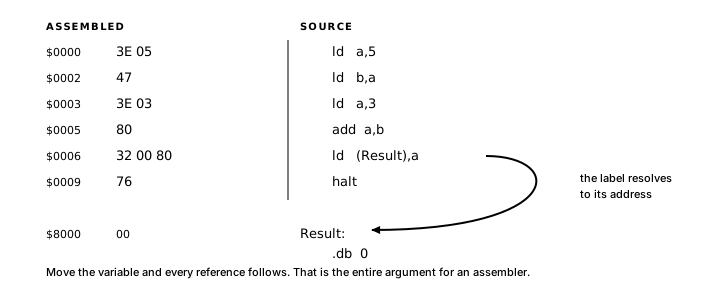
Here is the same add-5-and-3 program from Chapter 2, rewritten in assembly:
.org $0000
main:
  ld a, 5
  ld b, a
  ld a, 3
  add a, b
  ld (result), a
  halt

.org $8000
result: .db 0
The six instructions in the body of main are the same six operations you already saw in Chapter 2.
.org $0000 tells the assembler: everything from here assembles starting at address $0000. main: is a label. The assembler records it as the current address, so main refers to $0000. halt stops the CPU. .org $8000 starts a new block at $8000. result: is another label, and .db 0 places one byte with value 0 at the current address, so result refers to $8000.
ld a, 5 loads 5 into A. ld b, a copies A into B. ld a, 3 replaces A with 3. add a, b adds B (still 5) to A (now 3), leaving 8 in A.
ld (result), a stores A into the byte named result. The parentheses mean "memory at the address of result."
AZM Extensions and Standard Assembly
Two constructs in that program are directives to the assembler rather than instructions to the CPU: .org and .db.
Common assembler directives do their work at assembly time. .org places code and data at specific addresses, .equ names a compile-time constant, .db, .dw and .ds define storage, and .include brings another source file into the assembly. Other assemblers provide similar directives, although their names and exact behavior vary. AZM uses the dotted spellings shown here.
AZM adds the following on top:
op: defines an instruction sequence that expands inline at each call site, costing exactly what those instructions costtype/union: named record layouts with scalar types (byte,word,addr);sizeofandoffsetcompute byte sizes and field positions as compile-time constants;.dsaccepts type expressions such as.ds Sprite[16]enum: named sets of related constants, numbered automatically- register contracts: formal
.routineregister contracts on subroutines, verified by the assembler - string directives:
.cstr,.pstrand.istremit a string with a chosen framing: NUL terminator, length prefix or high-bit terminator
Every one of those additions resolves at assembly time, and the code that runs is still the Z80 instructions you wrote. Other languages call a named block of reusable code a function; in AZM it is a subroutine built from call and ret.
Placing code and data with .org
A Z80 program still has to respect the memory map from Chapter 1. Code has to land somewhere executable. Variables have to live somewhere writable.
.org $0000
main:
  ; ... code here ...
  halt

.org $8000
count:   .db 0
scratch: .dw 0
The assembler emits each block where .org directs, not in the order the blocks appear in the file.
The ld Instruction
ld copies a value from a source to a destination:
ld destination, sourceThe source stays as it was and the flags register is untouched.
A source can be a register, an immediate constant encoded directly in the instruction or a byte in memory. A destination can be a register or a byte in memory.
Parentheses in
ldmemory operandsIn the
ldforms used here, parentheses mean "use memory at this address."
ld a, bcopies register B into A, no memory involved.ld a, (hl)reads the byte at the address held in HL from memory.Adding or removing parentheses may select a different legal instruction, so the operand form is worth checking whenever memory is involved. Other instructions use parentheses for indirect jump targets and I/O ports.
The Z80 implements specific pairings of source and destination types. Chapter 4 covers the memory access forms and the complete LD forms table.
8-bit register to register
You can copy any of A, B, C, D, E, H and L into any other:
ld a, b     ; A = B
ld d, h     ; D = H
ld l, c     ; L = C
ld a, a     ; legal, pointless
Immediate constant into register
Any 8-bit register takes a one-byte immediate: either an unsigned value from 0 to 255 or a signed value from -128 to 127. Both interpretations produce the same eight-bit patterns. A 16-bit register pair takes a two-byte immediate: unsigned 0 to 65,535 or signed -32,768 to 32,767.
ld a, 42        ; A = 42
ld b, $FF       ; B = 255
ld hl, $8000    ; HL = $8000
ld ix, $4000    ; IX = $4000
Constants
A constant is a name the assembler substitutes for a fixed value:
MaxCount .equ 10
BaseAddr .equ $8000
Wherever you write the name, the assembler substitutes the value. ld a, MaxCount becomes ld a, 10. ld hl, BaseAddr becomes ld hl, $8000. A constant lives entirely at assembly time; its value ends up inside the instructions that use it.
The difference between a constant and a label: a constant is a value you write down (10, $8000). A label is an address the assembler computes from where things end up in the output.
Named Storage
Named storage looks like this:
.org $8000
count:   .db 0
scratch: .dw 0
count starts at $8000. scratch follows immediately at $8001, because count is one byte wide. Since scratch is a word, it occupies two bytes: $8001 and $8002. If count later becomes a word, every label after it moves up by one byte and the code that reads or writes them keeps working as written.
.db (define byte) places one byte at the current address. .dw (define word) places two bytes in little-endian order. The number that follows is the initial value.
You access named storage with parentheses, the same notation you use for any memory address:
ld a, (count)         ; A = byte at address of count
ld (count), a         ; byte at address of count = A
The parentheses mean the same thing everywhere:
| Notation | Meaning |
|---|---|
ld a, (hl) | Read byte at the address in HL |
ld a, (count) | Read byte at the address of count |
ld a, ($8000) | Read byte at address $8000 |
Chapter 4 covers word-size access (ld hl, (scratch)) and the full set of memory addressing forms.
ADD, INC and DEC
add a, b adds B to A and writes the result back into A. If you need A's original value later, copy it to another register before the add.
inc r adds 1 to register r; dec r subtracts 1. Both modify the register in place and update the flags. dec sets the Zero flag when the result reaches zero, which Chapters 5 and 6 put to use.
The Examples
Two example files accompany this chapter.
00_first_program.asm
The addition program from the beginning of this chapter: load two values, add them, store the result to a named variable.
01_register_moves.asm
.org $0000
main:
  ld a, $FF
  ld b, $10
  ld c, $20
  ld d, a
  ld e, b
  ld hl, $1234
  ld de, $5678
  ld bc, $0064
  ld d, h
  ld e, l
  halt
ld a, $FF loads 255 into A (an immediate load, the value encoded directly in the instruction bytes). ld d, a copies A into D, a register-to-register move, no memory involved.
ld hl, $1234 loads a 16-bit immediate into HL: H gets $12, L gets $34. The instruction encodes as three bytes: the opcode, then the value in little-endian order ($34 then $12).
ld de, $5678 overwrites both D and E. The $FF that was in D from the earlier copy is gone.
The final two instructions, ld d, h and ld e, l, copy HL into DE one byte at a time. After both, DE holds $1234. There is no ld de, hl instruction. A direct copy using ld therefore takes two 8-bit moves. Chapter 8 shows a stack-based transfer, while ex de, hl exchanges rather than copies the pairs.
Example 02_constants_and_labels.asm demonstrates word-size memory access and is walked through in Chapter 4.
Debugging a Wrong Result
A wrong result in assembly surfaces as a wrong byte in a register or in memory, and finding its cause means reading the listing, stepping the program and watching the flags.
Step 1: The assembler listing
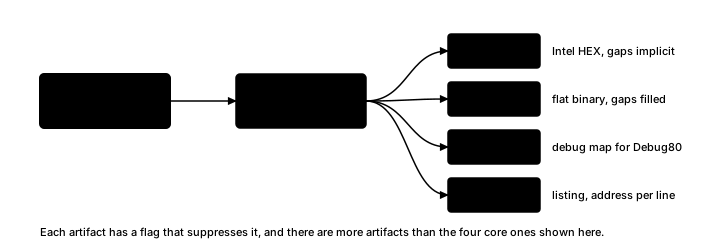
From a terminal, azm your-file.asm writes a .lst by default unless --nolst is present. In VS Code with Debug80, Run and Debug starts the selected target. Its outputDir receives a .lst and related artifacts that can be opened alongside the source. The listing shows each source line with its generated bytes and address. Before execution, it can confirm:
- Did the assembler report any errors or warnings?
- Is the data section placed where you intended? (
countat$8000,scratchat$8001?) - Does the entry point (
main) start at$0000, or wherever your memory map expects it?
A misplaced .org is one of the most common reasons a program assembles cleanly and then runs the wrong bytes.
Step 2: The emulator's step mode
Debug80 and most Z80 emulators can execute one instruction and pause. Predicting the register or memory location that should change before each step provides a specific result to compare with the state after the step.
If a register first acquires the wrong value after one instruction, inspect that instruction's source operand and the value it held before the step.
Step 3: Flag state
After an instruction that modifies flags (add, sub, cp, and, or, xor, inc, dec), the emulator's register display shows the resulting flag state. A jump that takes the wrong path often reads a flag set by an earlier instruction than the branch was intended to test.
The flag-before-branch check from Chapter 5 identifies which instruction set the flag and whether anything before the jump changed it.
Step 4: Memory after the program halts
Most Z80 emulators expose any memory address after execution. When a program stores a result to a named variable, the address of that variable shows whether the store succeeded. If the value is correct but the program still behaves unexpectedly, the problem may be in how the result is used later.
For the examples in this chapter: after 00_first_program.asm runs, address $8000 should hold $08.
Exercise
Register trace. A trace table should give A, B and C after each instruction and state whether any instruction changes HL.
ld a, $10
ld b, a
ld a, $06
add a, b
ld c, a
A complete test program with .org, main: and halt allows the final emulator state to be compared with the trace.