Source Syntax and Symbols
Line structure
Each ordinary source line contains one of:
- A label, optionally followed by an instruction or directive
- A standalone instruction or directive
- A comment alone
- A blank line
A label on the same line as an instruction:
BUFFER_SIZE   .equ 256
Start:        ld   a,0
A label on its own line, with the instruction on the next:
Start:
              ld   a,0
Labels on their own line are common for routines; labels on the same line are common for constants.
Some directives take a line of their own and emit no bytes:
.org $0100.routine has the same shape. It sits on the line above a label and records that routine's register contract, which Chapter 6 covers.
Chained instruction lines
Short instruction runs can share one physical line when the instructions are separated by a spaced backslash:
main: ld a,b \ inc a \ retAZM assembles that line exactly like the equivalent instructions on separate lines:
main:
        ld      a,b
        inc     a
        ret
The backslash must be readable as a separator, with whitespace on both sides. A backslash inside a quoted string is still part of the string, not an instruction separator.
A chain accepts only instructions and op invocations. A label may appear before the first instruction, but a later segment cannot have a label:
Start:  xor a \ ld b,a \ ret     ; valid

        ld a,1 \ .db 2           ; error: directive in a chain
        ld a,1 \ Next: inc a     ; error: later label in a chain
Whitespace and separators
One or more spaces or tabs separate tokens. Commas separate operand lists in .db, .dw and similar data directives:
.db $48,$65,$6C,$6C,$6F ; five bytesComments
A semicolon starts a comment that runs to the end of the line:
; This whole line is a comment.
        ld a,0   ; inline comment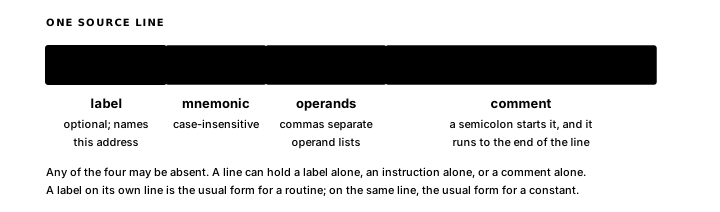
Labels
Symbols allow djnz ReadLoop in place of djnz $0105. AZM substitutes the address for each label reference in an operand or expression. The output binary contains only the resulting bytes.
A label names the assembly address at the point where it appears:
Buffer:
        .db 0
Code labels work the same way:
ReadLoop:
        ld      a,(hl)
        inc     hl
        djnz    ReadLoop
ReadLoop is the address of the ld instruction. djnz ReadLoop becomes a relative branch to that address.
Non-local labels
A plain label declares a non-local symbol. Calls, jumps, expressions and data declarations in the same assembled source unit can refer to it directly. Each non-local label in a source unit needs a name of its own.
; error: two definitions of Count
Count:  .db 0
Count:  .db 0
Label syntax
A plain label is an identifier followed by a colon, on a line by itself or before an instruction or directive:
MyLabel:
MyLabel: ld a,0
Non-local identifiers contain letters, digits and underscores and must start with a letter.
$ has two source-level meanings in AZM. By itself, it denotes the current assembly address; before hexadecimal digits, it starts a literal such as $4000. .import controls the privacy of declarations in imported files.
Owner-local labels
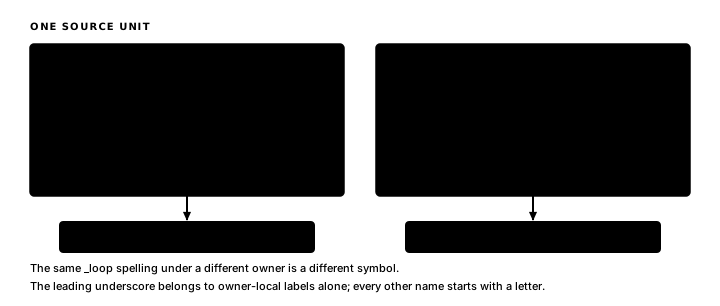
A label beginning with one underscore belongs to the nearest preceding non-local label. The same local spelling can be reused under another owner:
ShiftRow:
        ld      b,8
_loop:
        rl      (hl)
        inc     hl
        djnz    _loop
        ret

CopyRow:
        ld      b,8
_loop:
        ld      a,(de)
        ld      (hl),a
        inc     de
        inc     hl
        djnz    _loop
        ret
ShiftRow._loop and CopyRow._loop have distinct identities in AZM output and Debug80 maps. Source code uses the short _loop spelling. The leading _ belongs to owner-local labels alone; equates, enum members, type names and op names start with a letter. Names beginning with __ are reserved for assembler-generated symbols.
Forward references
Labels may be used before they are defined:
        ld      hl,DataTable
        ld      b,TABLE_LEN

DataTable:
        .db 1,2,3,4
TABLE_LEN .equ $ - DataTable
AZM uses a two-pass strategy: the first pass assigns addresses to all labels; the second pass substitutes those addresses into instruction encodings. Any reference still unresolved after both passes is an error, typically a typo in a label name.
Multiple labels at one address
Two or more labels can name the same address:
EntryA:
EntryB:
        ld      a,(hl)
        ret
Naming conventions
User symbols are case-sensitive. START, start and Start are three distinct symbols.
Preferred AZM style uses:
- Constants (
SCREEN_WIDTH,MAX_SPRITES,LCD_DATA): uppercase with underscores. - Routine and data labels (
DrawSprite:,InitTimer:,SpriteTable:): PascalCase. - Owner-local labels (
_loop:,_skipInit:,_done:): a leading underscore followed by short camelCase.
The assembler enforces no naming policy; different projects may use their own conventions.
Declaration syntax
Declarations put the declared name on the left. AZM convention omits the colon on a declaration and reserves it for address labels. The assembler accepts either spelling:
COUNT       .equ 8
Colour      .enum Red, Green, Blue

Sprite      .type
x           .field byte
y           .field byte
            .endtype

SpriteArray .typealias Sprite[2]
A colon marks an address label only. It names the current assembly address, not a constant or type:
COUNT   .equ 8      ; assemble-time constant

Count:              ; address label
        .db 8
AZM accepts COUNT: .equ 8, but this form conflicts with the convention: a colon marks an address, while .equ binds a value.
Directives
AZM's canonical directive names start with a dot:
.org .equ .db .dw .ds .endThe full directive list is in Appendix 1.
Directives are lowercase and case-sensitive. .db is the canonical form; .DB and .Db are parse errors. Compatibility forms for other assembler source are covered in Chapter 7.
Opcode and register case
AZM is case-insensitive for Z80 instruction mnemonics and register names. LD, ld and Ld all parse as the same instruction; A, a, HL and hl all name the same register. A consistent mnemonic case makes the project easier to read.
The --case-style flag reports mixed casing and enforces a consistent style.
Numeric literals
AZM accepts all numeric literal forms common in Z80 assembly:
| Form | Example | Base |
|---|---|---|
$ prefix | $FF, $0100 | hex |
0x prefix | 0xFF, 0x2A | hex |
Trailing H | 0FFH, 02AH | hex |
% prefix | %10101010 | binary |
0b prefix | 0b10101010 | binary |
Trailing B | 11110000B | binary |
| Plain decimal | 42, 255 | decimal |
| Quoted character | 'A', "Z" | ASCII value |
Trailing-H rule: the token must start with a decimal digit. 0FFH is hex 255. FFH starts with a letter, so the parser reads it as a symbol name. The unambiguous forms are $FF and 0FFH.
All numeric forms can appear freely in any expression and can be mixed within one expression:
WIDTH   .equ $20           ; hex prefix
HEIGHT  .equ 32            ; decimal
FLAGS   .equ %00001111     ; binary prefix
DOT     .equ 'A' + 1       ; ASCII + offset
SIZE    .equ WIDTH * HEIGHT ; 1024
Appendix 2 contains the full numeric literal table.