Raw Data, Storage and Strings
Assembly programs commonly contain bytes fixed at assemble time and storage filled at runtime.
.db — define bytes
.db emits one or more 8-bit values:
        .db 0              ; one zero byte
        .db $FF            ; one byte: 255
        .db 1,2,3,4        ; four bytes
        .db $48,$65,$6C,$6C,$6F   ; "Hello" in hex
Unsigned data belongs in the range 0–255 and signed data in the range −128–127. AZM currently writes the low eight bits of a numeric .db expression without a range diagnostic, so larger or more negative values wrap.
String literals are also valid in .db:
        .db "Hello, AZM",0        ; text followed by NUL terminator
        .db "Error: ",MSG_CODE    ; mix of string and expression
Each character in a double-quoted string contributes one byte at its ASCII value. The 0 at the end is a separate expression, not part of the string literal.
Multiple operands can appear on one .db line, separated by commas, or across multiple .db lines:
Msg:
        .db "Hello"
        .db ","
        .db " World",0
This emits the same bytes as .db "Hello, World",0.
.dw — define words
.dw emits one or more 16-bit values in Z80 byte order.
Little-endian byte order
The Z80 is little-endian: the low byte of a 16-bit value is stored at the lower address. Every 16-bit immediate and address in AZM follows this rule.
        .dw $1234         ; two bytes: $34 $12
        .dw 1000,2000     ; four bytes: $E8 $03 $D0 $07
        .dw VECTOR_TABLE  ; address of the label, low byte first
.dw accepts unsigned word values (0–65535) or signed word values (−32768–32767). Negative values are encoded in 16-bit two's-complement form.
Labels inside data
Labels can appear between or before any .db / .dw line:
JumpTable:
        .dw HANDLER_A
        .dw HANDLER_B
        .dw HANDLER_C
JumpTableEnd:
TABLE_LEN .equ JumpTableEnd - JumpTable   ; = 6 bytes = 3 entries
String directives
AZM provides three string-specific directives that set a termination policy explicitly.
.cstr (C-style string, NUL terminated):
.cstr "Hello" ; emits: H e l l o $00This is equivalent to .db "Hello",0 but makes the termination policy explicit. .cstr suits routines that scan forward until they read a zero byte.
.pstr (Pascal-style string, length prefix):
.pstr "Hello" ; emits: $05 H e l l oThe first byte stores the string length modulo 256. .pstr strings should contain no more than 255 characters; AZM currently gives no diagnostic for a longer string, and the length prefix wraps. The format suits routines that read a leading byte count.
.istr (inverted terminator string):
.istr "Hello" ; emits: H e l l (o | $80)All bytes emit at their ASCII value except the last character, which has bit 7 set ($6F | $80 = $EF for lowercase o). Some older ROM routines use this encoding; the receiving loop checks for bit 7 to detect the final byte.
Target routines that expect another format require a direct .db definition.
Jump and call tables
CmdTable:
        .dw do_draw     ; 0
        .dw do_move     ; 1
        .dw do_rotate   ; 2
        .dw do_erase    ; 3
CMD_COUNT .equ ($ - CmdTable) / 2

; Dispatch: A = command index (0 to CMD_COUNT-1)
        ld   hl,CmdTable
        ld   b,0
        ld   c,a
        add  hl,bc
        add  hl,bc        ; HL = CmdTable + A * 2
        ld   a,(hl)
        inc  hl
        ld   h,(hl)
        ld   l,a          ; HL = handler address
        jp   (hl)
CMD_COUNT uses $ - CmdTable divided by 2 because each .dw entry is two bytes.
.ds — reserve storage
.ds count reserves space by advancing the address counter, leaving those bytes as it found them.
Basic syntax
Counter:
        .ds 1          ; reserve 1 byte

Buffer:
        .ds 64         ; reserve 64 bytes

Stack:
        .ds 256        ; reserve 256 bytes
The operand is a byte count and should be zero or more. A negative count moves the assembly address backwards, and AZM currently accepts it in silence. Labels placed before .ds name the start of the reserved block.
Optional fill byte
A second operand specifies a fill value for the reserved region in the flat binary output:
Page:
        .ds 256,0      ; reserve 256 bytes filled with zero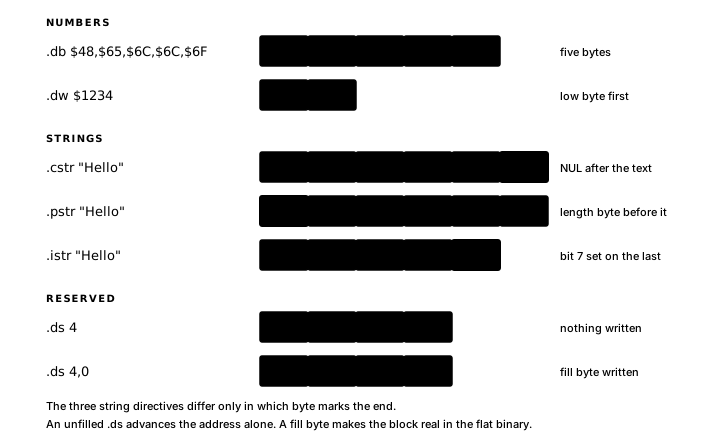
Storage maps
A dedicated .org can group .ds blocks for several independent storage areas:
; --- RAM layout: $8000-$8FFF ---
        .org $8000

RingBuf:        .ds 8
RingHead:       .ds 1
RingTail:       .ds 1
RingCount:      .ds 1

FrameBuf:       .ds FRAME_W * FRAME_H

        .org $8FFE
StackTop:       .ds 2
In the storage map above, declaration order determines the implicit field offsets. Inserting a field changes every following offset. Chapter 5 shows the structured equivalent: a .type declaration names the fields, and the layout system computes every offset.