Addresses, Constants and Expressions
Assembly programs use names for memory locations and names for constant values. Labels provide the locations; .equ definitions and enums provide the values.
.org sets the assembly address
.org $0100After this directive, AZM places the next byte at address $0100. Labels defined after it get addresses starting there. Assembly begins at address 0 until an .org sets a different address.
Multiple .org directives can place sections from one source file at different addresses:
        .org $0100

CodeStart:
        ld   a,42
        ld   (Result),a
        halt

        .org $8000

Result:
        .db 0
The code and the data byte land in the same output binary at their respective offsets.
.org sets the assembly address assigned to the next byte. That address is distinct from the byte's position in the output file. The directive moves the address but emits no bytes; subsequent instructions and directives provide the bytes.
The address only moves forward. AZM silently ignores an .org behind the last byte assembled, and the next byte uses the next free address. Existing bytes remain unchanged. A following label can therefore receive an address that no source line names explicitly.
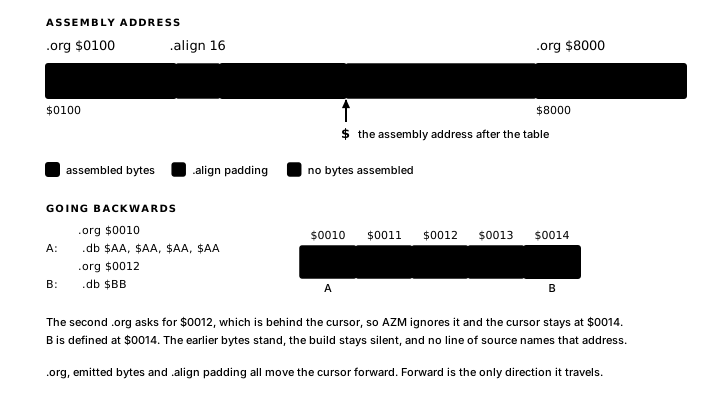
$ — the current assembly address
$ evaluates to the current assembly address at the point it appears.
Table length:
Table:
        .db $01,$02,$03,$04,$08
TABLE_LEN   .equ $ - Table
After the .db line, $ is the address one past the last byte of Table. $ - Table gives the number of bytes in the table as an assembler-time constant.
Code size:
        .org $0100
CodeStart:
        ; ... code ...
CodeEnd:
CODE_SIZE   .equ CodeEnd - CodeStart
Label subtraction makes the intent clear and keeps the result correct when the code moves.
Gaps between origins
Two .org directives separated by an address gap affect each output format differently:
- Flat binary: bytes are emitted in address order. If the first section ends at
$01FFand the next.orgis$8000, the binary fills the gap with zero bytes unless.binfrom/.bintotrim it. - Intel HEX: records are emitted only for the addresses that contain assembled bytes. Gaps in HEX are implicit.
.binfrom and .binto mark the address range to include in the flat binary:
        .binfrom $0100
        ; ... code and data ...
        .binto $0200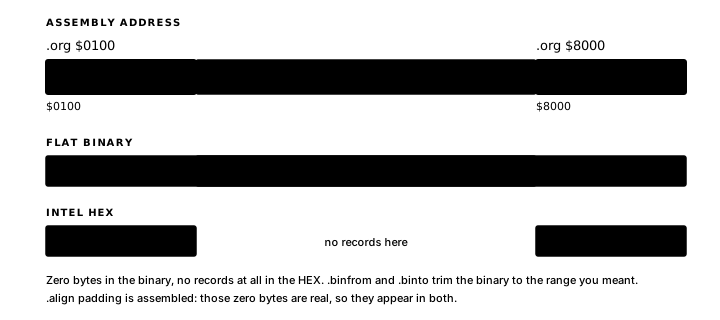
.align
.align 16.align advances the assembly address to the next multiple of 16 and inserts zero bytes to fill the gap. The directive supplies address alignment required by hardware or lookup tables.
Constants with .equ
.equ binds a name to a constant expression, entirely at assembly time. The name becomes a synonym for the value, usable in any expression context: instruction operands, data directives, storage counts, layout sizes and other .equ expressions.
The canonical form:
MAX_COUNT .equ 64A name is global in the translation unit and can be defined once. Defining the same name twice is an error:
COUNT   .equ 10
COUNT   .equ 20   ; error: duplicate symbol
Hardware constants
.equ constants can name port addresses and memory-mapped I/O addresses:
LCD_DATA    .equ $00
LCD_CTRL    .equ $01
KEY_PORT    .equ $00

MON_PUTC    .equ $0008
MON_GETC    .equ $000B
When hardware changes, one edit in the hardware-definition file propagates everywhere.
Address constants
WORK_BASE   .equ $8000
STACK_TOP   .equ $87FF
SCREEN_RAM .equ $4000 ld sp,STACK_TOP
ld hl,SCREEN_RAMSize constants
Deriving sizes from other constants keeps arithmetic in one place:
TILE_W      .equ 8
TILE_H      .equ 8
TILE_BYTES  .equ TILE_W * TILE_H

SCREEN_W    .equ 128
SCREEN_H    .equ 64
SCREEN_ROWS .equ SCREEN_H / TILE_H
Label subtraction records a layout assumption as an assembler-time constant:
DispatchA:
        jp   HANDLER_A
DispatchB:
        jp   HANDLER_B
ENTRY_STRIDE .equ DispatchB - DispatchA   ; 3: jp is a 3-byte instruction
Any code that dispatches through this table loads ENTRY_STRIDE by name.
Forward references in .equ
A .equ expression may reference a label or another .equ defined later in the source:
TABLE_LEN   .equ TableEnd - TableStart

TableStart:
        .db 1,2,3,4
TableEnd:
AZM resolves forward references across passes. Circular references produce an error.
Expressions
An expression combines numeric literals, symbols and arithmetic operators. The assembler evaluates it to an integer before writing the binary. Expressions can appear in numeric contexts: instruction operands, .equ definitions and .db / .dw / .ds operands.
Arithmetic operators
AZM supports symbolic operators: + - * / % & | ^ ~ << >>.
The % operator between two expressions performs integer modulo. A % at the start of a value is a binary literal prefix, covered in Chapter 2.
Operator precedence follows conventional arithmetic rules. Parentheses group sub-expressions:
FRAME_SIZE  .equ (COLS * ROWS) + 2
ENTRY_ADDR  .equ TABLE_BASE + (ENTRY_NUM * 3)
Appendix 2 contains the full precedence table.
$ in expressions
Msg:    .db "Hello"
MSG_LEN .equ $ - Msg        ; byte count of "Hello"
In a .equ or data context, $ resolves to the address after the last emitted byte on the preceding line.
Expressions in instructions
        ld   a,PORT_BASE + 1
        ld   hl,BUFFER + OFFSET
        bit  FLAG_BIT,a
Expressions in data directives
.db MAX_VAL - 1
.dw TABLE_BASE + STRIDE * 3
.ds SPRITE_COUNT * 4
Byte data belongs in the unsigned range 0–255 or the signed range −128–127. .dw accepts unsigned word values (0–65535) or signed word values (−32768–32767) and reports values outside those ranges. Negative values are encoded in two's-complement form. A .ds count must be non-negative.
A 16-bit address splits into two bytes as follows:
.db VECTOR_TABLE & $FF       ; low byte
.db (VECTOR_TABLE >> 8) & $FF ; high byte
Assembler-time evaluation
Every expression in AZM is evaluated by the assembler before anything runs on the Z80.
Runtime-dependent values belong in Z80 instructions:
add hl,bc ; result depends on HL and BC at runtimeRange checks
| Context | Signed and unsigned range | Enforcement |
|---|---|---|
8-bit immediate (ld a,n) | 0–255 unsigned or −128–127 signed | Checked |
8-bit data (.db) | 0–255 unsigned or −128–127 signed | Not checked; low eight bits are emitted |
| Signed 8-bit branch offset | −128–127 from the next PC | Checked |
bit/set/res bit index | 0–7 | Checked |
16-bit immediate (ld hl,nn) | 0–65535 unsigned or −32768–32767 signed | Checked |
16-bit data (.dw) | 0–65535 unsigned or −32768–32767 signed | Checked |
Port number (in a,(n)) | 0–255 unsigned or −128–127 signed | Checked |
For checked contexts, a value outside the encoding range produces a range diagnostic. Unchecked .db wrapping is current assembler behaviour, but source should still use the stated signed or unsigned range so that the intended value remains clear.
Expression errors
Expression errors include:
- Unknown symbol: a name with no
.equ, label or layout definition - Circular reference: an
.equthat transitively references itself - Division by zero:
expr / 0 - Range overflow: a computed value outside the encoding range
Chapter 8 covers diagnostic messages.
Conditional assembly
.if, .else and .endif select source at assemble time. A non-zero expression selects the first branch; zero selects the optional .else branch:
DEBUG .equ 1

        .if DEBUG
        ld   a,1        ; diagnostics enabled
        .else
        xor  a          ; diagnostics disabled
        .endif
Conditions may use numeric literals and .equ values defined earlier in the active source. Conditional blocks may be nested. Because AZM resolves conditional assembly before it assigns addresses, a condition is limited to values known by then: numeric literals, and .equ values built from them.
AZM reports unmatched or repeated .else directives, unmatched .endif directives and unterminated .if blocks.
Enums as grouped constants
Related .equ constants often form a sequence:
RED   .equ 0
GREEN .equ 1
BLUE  .equ 2
Adding YELLOW between RED and GREEN requires renumbering GREEN, BLUE and everything that follows.
An enum groups related constants under a single name and assigns their values automatically. AZM assigns 0 to the first listed member, 1 to the second and so on:
Mode .enum Read, Write, AppendThe name comes first, then .enum, then a comma-separated member list. Each member gets a qualified name, formed from the group name, a dot and the member name:
| Name | Value |
|---|---|
Mode.Read | 0 |
Mode.Write | 1 |
Mode.Append | 2 |
The qualifier is always required. Read alone is an error:
        ld   a,Read      ; error: enum member "Read" must be qualified
        ld   a,Mode.Read ; correct
When two enums share a word, the group name separates them:
Color .enum Red, Green, Blue
State .enum Idle, Active, Dead

; Color.Red = 0, State.Idle = 0 - different symbols
Enum members are valid in any assembler-time expression context:
        ld   a,Mode.Write       ; load 1 into A
        cp   Mode.Append        ; compare A with 2
        .db Mode.Read           ; emit byte 0
For a handful of states, a cp chain is readable:
        ld   a,(mode)
        cp   Mode.Write
        jr   z,handle_write
        cp   Mode.Append
        jr   z,handle_append
        ; falls through: Mode.Read or unrecognized
When there are many values and performance matters, a jump table is more efficient:
Cmd .enum Draw, Move, Erase

; C = Cmd.* value, guaranteed 0-2
        ld   hl,CmdTable
        ld   b,0
        add  hl,bc
        add  hl,bc
        add  hl,bc           ; HL = CmdTable + cmd * 3
        jp   (hl)

CmdTable:
        jp   do_draw
        jp   do_move
        jp   do_erase
Choosing enums
Enums suit small sets of named states, command codes, token kinds or hardware-mode values where a dense sequence is natural. State.Dead reads more clearly than cp 3. Values that require specific numbers, such as port addresses, bitmasks and hardware registers, belong in .equ definitions. At runtime, an enum value is an ordinary byte, so input validation must occur before dispatch.