Building Rushlight
Skyfall settled every landing with one subtraction against a column number. The paddle and the drop shared the same eight columns, because the 8x8 RGB LED matrix is a board. The VDP takes that certainty away. Sprites stand at pixel positions on a 256x192 scene, gliding in front of a tile grid that stores a separate picture. Collision now requires tests between sprite coordinates and between sprite pixels and grid cells.
This chapter builds a complete game around those two questions: Rushlight. You are a white fly over a night garden, steered with 2/4/6/8, one pixel per frame. A lantern glows somewhere in the grid; when the fly reaches its cell, the lantern is gathered, the score climbs on the LCD, and a fresh one appears somewhere else. A wasp hunts you throughout the round, and every lantern you take quickens its stride. When it reaches you, the game ends. Around all of it stand the splash, playing and game-over cards, now running over VRAM shadows. The complete source is included as rushlight.glim. The text concentrates on the parts specific to this game, while the four movement effects follow Grove and the GameOver card follows Skyfall.
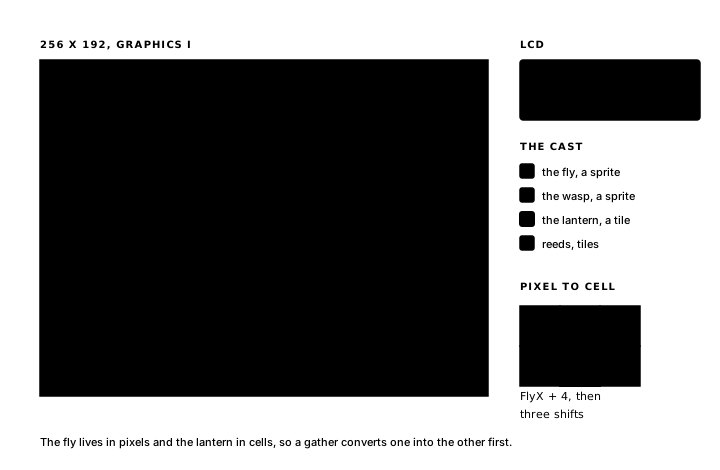
Rushlight on paper
Before any block is written, the design can be stated in Glimmer's terms. For Rushlight, the facts split into two coordinate systems. Sprites glide, so FlyX/FlyY and WaspX/WaspY hold the two movers' top-left pixels. The lantern sits in one grid cell at a time, so LampCol and LampRow hold a grid column and row. Score counts lanterns for the LCD, and Armed gates the restart.
The moments: four held pulses steer the fly, ChaseTick moves the wasp, AnyKeyP starts and restarts, and GateP opens the restart gate. Two schedules drive ChaseTick and GateP: Pace, a writable oscillator that is at once the wasp's stride and the game's difficulty, and Wait, the game-over one-shot. These timers serve the same roles as Skyfall's, and the three cards form the same loop. The budget check counts eight facts, seven moments and CurrentCard, which use 16 of the 32 change-flag cells.
The scene and the declarations
The file opens the way Grove's did (program Rushlight, the platform line, display tms9918), and then it declares the cast. Here are the two members you meet first:
sprite Fly color white
  "X......X"
  ".X....X."
  "..XXXX.."
  ".XXXXXX."
  ".XXXXXX."
  "..XXXX.."
  "...XX..."
  "........"
end

tile Lantern color lightyellow on black
  "...XX..."
  "..XXXX.."
  ".X.XX.X."
  ".XXXXXX."
  ".XXXXXX."
  "..XXXX.."
  "...XX..."
  "........"
end
A second sprite, Wasp color darkyellow, and a second tile, Reed color medgreen on black, follow in the same shape. Each accepts any eight strings of X and .. The build depends on the order and the colour pairs: the sprites take slots 0 and 1, Lantern's pair comes first so that black is the screen background, and Reed's pair opens the next bank. The generated equates read Lantern .equ 1, Reed .equ 8. The rest of the file's top is your paper design, typed in:
state FlyX    : byte = 124      ; the fly's top-left pixel
state FlyY    : byte = 92
state WaspX   : byte = 8        ; the wasp's top-left pixel
state WaspY   : byte = 8
state LampCol : byte = 24       ; the lantern's grid cell
state LampRow : byte = 6
state Score   : byte            ; lanterns gathered
state Armed   : byte            ; game-over gate open: restart allowed

pulse UpP
pulse DownP
pulse LeftP
pulse RightP
pulse ChaseTick
pulse AnyKeyP
pulse GateP

timer Pace : byte = 8 -> ChaseTick   ; the wasp's stride; lanterns shrink it
timer Wait : word = 0 -> GateP once  ; armed on game over

bind key KEY_2 held period 1 -> UpP
bind key KEY_8 held period 1 -> DownP
bind key KEY_4 held period 1 -> LeftP
bind key KEY_6 held period 1 -> RightP
bind key any   rising -> AnyKeyP

text MsgTitle "RUSHLIGHT       "
text MsgRun   "GATHER THE LAMPS"
text MsgOver  "THE WASP GOT YOU"
text MsgAny   "PRESS ANY KEY   "
text MsgScore "LAMPS "
text MsgPad   "        "
The cards handle startup here, exactly as in Skyfall, and every row-one message is padded to sixteen characters so that each card's writing covers whatever the previous card left behind. And the initial values: fly at the centre, wasp in the far corner, lantern at cell (24, 6).
The splash card plants the garden
Grove planted its scene with a changed cell; a card can do the same job with an enter block:
enter SplashShow
begin
    lcd_row MsgTitle, LcdRow1
    lcd_row MsgAny,   LcdRow2
    tile_at Reed, 3, 2
    tile_at Reed, 11, 21
    tile_at Reed, 17, 2
    tile_at Reed, 24, 22
    tile_at Reed, 29, 21
    ld a,(LampCol)      ; take the last round's lantern off the grid
    ld d,a
    ld a,(LampRow)
    ld e,a
    xor a
    call NamePut
    xor a               ; hide slot 0: sprite scanning stops there
    ld d,0
    ld e,$D1
    call SpriteSet
end
Five tile_at lines stand five reeds in the dark, their coordinates written as immediates because the reeds stand where they are planted. The two calls after them clear the stage. The first knows the lantern only through state: wherever the last round left it, LampCol and LampRow still say so, and the block loads them into D and E and writes the blank tile through NamePut, the runtime-coordinate path. The second parks sprite slot 0 at y = $D1, the terminator value used at startup: the VDP stops processing sprites at the first slot holding it, so one write hides the fly and the wasp together. On the very first frame both calls write values that are already in place. The card's one effect, StartGame, is the opening move: on AnyKeyP, goto Playing.
Entering play
card Playing opens with its enter block:
; Entry re-raises every cell this card's renders draw from; the body
; gives those cells their round-start values first.
enter StartRound
    updates FlyX, FlyY, WaspX, WaspY, LampCol, LampRow, Score, Pace
begin
    lcd_row MsgRun, LcdRow1
    ld a,124
    ld (FlyX),a
    ld a,92
    ld (FlyY),a
    ld a,8
    ld (WaspX),a
    ld (WaspY),a
    ld a,24
    ld (LampCol),a
    ld a,6
    ld (LampRow),a
    xor a
    ld (Score),a
    ld a,8
    ld (Pace),a         ; the wasp starts at a stroll
end
The entry re-raise is needed because a card-gated render sees only the flags raised while its card is active. The updates line names every cell read by the Playing renders and marks them all, so the first frame of play repaints the complete scene. The body writes the round-start values first, and replay falls out of that ordering: every round begins exactly where the first one did, repainted from fresh values, with the entry block as the single reset path. Pace closes the list as Gravity did in Skyfall: the body stores the new value, and the entry line documents the write.
Four move effects steer the fly. They are Grove's four moves with the moth's cells and pulses renamed for the fly. Up and left stop at zero, down at 184, right at 248, each on a separate held pulse at period 1.
The chaser
The wasp hunts by stepping toward the fly on both axes:
effect ChaseStep
    on ChaseTick
    updates WaspX, WaspY
begin
    ld a,(FlyX)
    ld b,a
    ld a,(WaspX)
    cp b
    jr z,_vert          ; level: no sideways step
    jr c,_right         ; left of the fly: step right
    dec a
    jr _wx
_right:
    inc a
_wx:
    ld (WaspX),a
_vert:
    ld a,(FlyY)
    ld b,a
    ld a,(WaspY)
    cp b
    jr z,_done
    jr c,_down
    dec a
    jr _wy
_down:
    inc a
_wy:
    ld (WaspY),a
_done:
end
Every ChaseTick, one compare per axis points the wasp at the fly. Carry out of cp b means the wasp sits left of, or above, its target, so it steps toward; no carry steps the other way; equal skips the axis. The fly's clamps define the space for both of them: the wasp only ever steps toward the fly, so it stays inside the same bounds and needs no additional clamps. The stride is Pace. At the opening period of 8 the wasp drifts, and every gathered lantern will shrink the period, all the way down to 1, a step every frame on both axes at once, which is faster than you: the keypad moves the fly one axis at a time, and the wasp corners diagonally.
Gathering from the grid
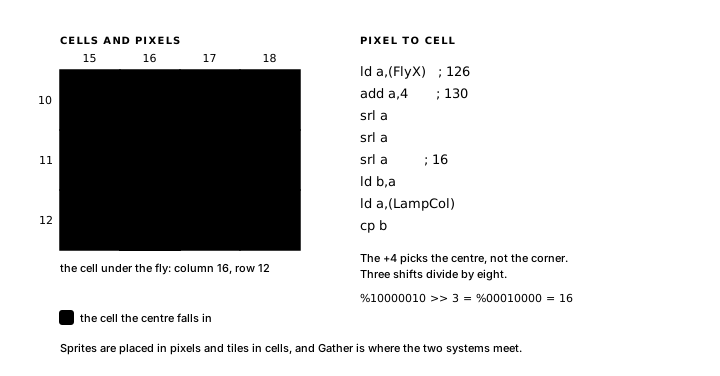
The fly is in pixels and the lantern is in cells, so before the two can meet, one coordinate system has to be converted into the other:
effect Gather
    on FlyX, FlyY
    updates Score, LampCol, LampRow, Pace
begin
    ld a,(FlyX)         ; the grid cell under the fly's centre
    add a,4
    srl a
    srl a
    srl a
    ld b,a
    ld a,(LampCol)
    cp b
    jr nz,_done
    ld a,(FlyY)
    add a,4
    srl a
    srl a
    srl a
    ld b,a
    ld a,(LampRow)
    cp b
    jr nz,_done
    ld a,(LampCol)      ; gathered: take the lantern off the grid
    ld d,a
    ld a,(LampRow)
    ld e,a
    xor a
    call NamePut
    ld a,(Score)
    inc a
    ld (Score),a
    ld a,(Pace)         ; quicken the wasp, floor at one frame
    cp 2
    jr c,_respawn
    dec a
    ld (Pace),a
_respawn:
    ld c,ApiRandom
    rst $10
    and %00011111       ; column 0..31
    ld (LampCol),a
    ld c,ApiRandom
    rst $10
    and %00001111
    add a,4             ; row 4..19: clear of the reeds
    ld (LampRow),a
_done:
end
Adding 4 picks the pixel at the fly's centre, and three shifts divide by eight: pixel position to grid cell in four instructions. Either the cell matches the lantern's column and row or the block leaves. On a match, the old cell goes blank through NamePut first, and it must go blank here, inside the effect: four lines later the respawn overwrites LampCol and LampRow, and the old cell's address is gone with them. Then the score climbs, Pace shrinks against its floor (the difficulty screw, turned by an ordinary timer write, as in Skyfall), and the respawn masks one random byte down to a column and folds another into rows 4..19, the band the reeds leave clear.
PlaceLantern, on LampCol, LampRow, is the six-line runtime NamePut call from SplashShow with ld a,Lantern in place of the xor a, and it handles two cases: Gather respawns the lantern mid-round, and StartRound's re-raise draws the first lantern on round entry. Two more renders, Grove's PlaceMoth twice over, place the movers: sprite_at Fly, FlyX, FlyY in PlaceFly, and the same shape for the wasp in PlaceWasp.
The updates line raises all four flags every time Gather runs, the misses included, and with on FlyX, FlyY, Gather runs on every step the fly takes. So a frame where the fly merely moved also re-runs PlaceLantern and ShowScore: the lantern's name-table row goes back through the commit, and the LCD is rewritten with the score it already shows. The result stays correct (a render redraws from current facts, and redrawing the same picture is a correct redraw), but the commit retransmits an unchanged row. When the transfer volume warrants it, the refinement is to split the work: let the movement-triggered block do the cheap test alone and raise a pulse only on a catch, then hang the four-flag effect on that pulse. Rushlight keeps the simpler version because its transfer volume remains small.
Colliding with the wasp
And here is the other question the chapter opened with: when have two sprites met?
effect Caught
    on FlyX, FlyY, WaspX, WaspY
    updates CurrentCard
begin
    ld a,(FlyX)
    ld b,a
    ld a,(WaspX)
    sub b
    jr nc,_ax
    neg
_ax:
    cp 6                ; tolerance: boxes overlap deeply
    jr nc,_done
    ld a,(FlyY)
    ld b,a
    ld a,(WaspY)
    sub b
    jr nc,_ay
    neg
_ay:
    cp 6
    jr nc,_done
    ld a,Card.GameOver  ; conditional navigation, as in Skyfall
    ld (CurrentCard),a
_done:
end
Sprite collision is the distance between two facts. sub b and a conditional neg produce the absolute pixel difference on one axis, and both differences under a tolerance means caught. Skyfall resolved a landing with one subtraction; sprite collision uses one subtraction per axis, folded absolute before the compare, the same arithmetic, grown a dimension. The technique has a name you will meet in every sprite game: axis-aligned bounding-box collision. Each sprite is represented by an 8x8 box, the differences compare the boxes' top-left corners, and at a difference of 8 the boxes sit edge to edge, so cp 8 fires on any box overlap, while at 6 the boxes must share at least a three-pixel band on each axis. Boxes collide, not pixels, and that matters for sparse patterns: two thin sprites can overlap boxes without a single opaque pixel touching. Pixel-perfect collision would go on to compare the patterns themselves; for a fly and a wasp with full bodies, deep box overlap reads as contact, and the tolerance is where you get to be a designer: 8 ends the game the frame the boxes meet, while a threshold of 6 requires closer contact and makes near misses more likely. The ending writes CurrentCard directly because the transition depends on the runtime collision test.
The score on the LCD
The seven-segment HUD stayed behind with the 8x8 matrix profile, so on this hardware the LCD carries the number, extending the idiom Skyfall's lives display built:
render ShowScore
    on Score
begin
    lcd_row MsgScore, LcdRow2
    ld a,(Score)
    ld b,'0'            ; tens digit, counted up in ASCII
_tens:
    cp 10
    jr c,_tdone
    sub 10
    inc b
    jr _tens
_tdone:
    ld a,b
    ld c,ApiCharToLcd
    rst $10
    ld a,(Score)        ; ones digit: reduce the score again
_ones:
    cp 10
    jr c,_odone
    sub 10
    jr _ones
_odone:
    add a,'0'
    ld c,ApiCharToLcd
    rst $10
    ld hl,MsgPad        ; cover the tail of the old row-2 message
    ld c,ApiStringToLcd
    rst $10
end
lcd_row streams its string and leaves the cursor sitting exactly where the digits belong. The tens digit counts up in B, starting at '0' and stepping once per subtracted ten, then goes out through ApiCharToLcd. After that the block reads Score again and reduces it a second time for the ones digit, deliberately, so the value comes fresh from memory after the API call. The eight spaces of MsgPad cover the tail of the splash card's invitation, so the complete row reads LAMPS 07 after every score change.
The counted digits stop at two: past 99 the tens character would step beyond '9' into the character set's punctuation. This scoreboard therefore treats 99 as its ceiling (at the pace the wasp closes in, a two-digit game is a long one), and a version built to run richer needs either a cap where the digits end or a hundreds pass in the same counting style.
Game over, gated
Rushlight reuses Skyfall's delayed restart gate. GameOverShow closes Armed and starts Wait; OpenGate later writes MsgAny and opens the gate; Restart tests Armed before writing Card.Splash. Card gating stops the move and chase blocks, so the shadows hold still and VRAM keeps the final scene exactly as it stood: the wasp frozen on top of the fly among the reeds, the score on the LCD naming the run. A restart walks the loop back through Splash, where SplashShow hides the actors and strikes the lantern.
Inside the generated file
Building the full source (glimmer build rushlight.glim with the companion file) produces these render blocks in rushlight.main.asm:
; --- render block PlaceFly ---
.routine
Glim_PlaceFly:
    sprite_at Fly, FlyX, FlyY
        ret
The line stands in the generated file exactly as you wrote it, because sprite_at is an op, so the assembler substitutes its body at each call site. This one line assembles as the six instructions from the op definition with this site's arguments folded in: FlyX and FlyY read into D and E, Fly becoming ld a,0, then call SpriteSet. Glim_SplashShow reads the same way, five tile_at lines, one op, five expansions, each with the corresponding reed coordinates as immediate loads.
The enter block's wrapper shows delivery again:
        ld      a,(Raised0)          ; deliver to later phases this frame
        or      CHG_LAMPCOL + CHG_LAMPROW + CHG_SCORE
        ld      (Raised0),a
        ld      a,(Next0)            ; a consumer already ran: defer to next frame
        or      CHG_FLYX + CHG_FLYY + CHG_WASPX + CHG_WASPY
        ld      (Next0),a
        ret
StartRound names eight cells, and Glimmer stages them in two groups, obeying the scheduler's exactly-once rule. LampCol, LampRow, and Score have render consumers only, so they travel through Raised0 and reach PlaceLantern and ShowScore in the same frame: the lantern and the score appear the instant play begins. The four sprite cells also feed Gather and Caught (logic blocks whose phase has already run), so that whole change defers through Next0, and the fly and wasp take the stage one frame later.
The same staging determines motion latency. With key 6 held, frame N runs MoveRight, which steps FlyX, and the change defers, because Gather and Caught sit in the same phase. Frame N+1: the two effects test the new position, PlaceFly runs, and SpriteSet stores two shadow bytes (y, then x) and sets SpriteDirty. Frame N+2 opens in the vertical blank, GlimCommit sees the flag and streams all 128 sprite-attribute bytes to VRAM, and the fly stands one pixel to the right. Two frames of latency from pulse to picture, then, at full rate: the pipeline refills every frame, so a held key still moves the sprite by one pixel per refresh. A gather frame adds up to two dirty name rows, 32 bytes each; on a still frame, the commit reads one clear flag and three clear group bytes while the VDP continues refreshing the scene from VRAM.
Reading Sprite Chase
The repository ships this chapter's cousin: examples/sprite-chase.glim, the same profile with the chase turned inside out. Your sprite does the hunting, the target flees, and catching it scores. Its single card Playing opens with the entry re-raise idiom at its purest: StartPlaying has an empty body and four position cells in its updates line; the initial values already hold the scene, so entry marks them and the renders paint them, StartRound with its reset code removed. Its MovePlayer folds the four move effects into one block by reading the pulse cells directly, ld a,(UpP) and its three siblings, which is legal because a pulse is a byte cell like any other for the frame it holds.
The rest of the file is variations on blocks you have already written. FleeTarget is ChaseStep with the conclusion flipped (carry steps away) plus separate clamps, because fleeing runs into walls. Collide is Caught at tolerance 8 with a respawn where your game changes card, and the respawn masks ApiRandom exactly as Gather does. The score display swaps surfaces: DrawScore calls NamePut with a runtime column and drops a Pip tile on the top grid row, the tile grid itself as scoreboard, where Rushlight borrowed the LCD.
The last chapter compares the two games: Two Displays, One Language.
Exercise
Pixel and grid coordinates. The fly is at pixel position (124, 92). Which grid cell contains its centre, and what happens when the lantern is in that cell?