Motion Curves
The ramp provides a frame clock: a byte that advances from 0 to its last step, once per frame, and is marked changed at every step. A compute block can turn that progress into a moving position. Dividing a 64-step ramp by eight makes a dot cross the 8x8 RGB LED matrix:
compute TrackComet
    on Travel
    updates CometX
begin
    ld a,(Travel)
    srl a
    srl a
    srl a               ; column = Travel / 8
    ld (CometX),a
end
Sixty-four frames, eight columns, eight frames on each: the crossing is perfectly even. The table places the dot on schedule, and the result looks like a position being updated. The difference between position and motion is the difference between a slide rule and a thrown ball. The slider moves because a hand pushes it, at whatever pace the hand keeps. The ball leaves your hand fast and slows as it climbs; a landing bird glides in; a released spring shoots past its rest point and settles back. Motion in the world accelerates and eases, and your eye has spent a lifetime learning its shapes. On the 8x8 matrix the columns are fixed, so all of that character comes from the timing: how many frames the dot dwells on each column before moving on.
Shaping the steps by hand means arithmetic every frame (squares, roots, eight-bit fractions) inside a frame that also has input and drawing to run. A curve declaration names a motion shape, and the compiler turns it into a table of bytes inside the generated program. The expensive mathematics happens once, at build time on the development computer. The Z80 performs one table read per frame.
Comet
This chapter's program is Comet: a flight you can launch on demand. The dot starts at the left edge of the middle row. GO launches it across the row: quick off the pad, slowing all the way, gliding in to land near the right edge. GO again at any time, even mid-flight, launches it again.
program Comet

platform tec1g-mon3
display matrix8x8

state CometX : byte = 0 changed

pulse Go
pulse Landed

ramp Travel : byte steps 64 -> Landed

curve Glide ease_out steps 64 from 0 to 6

bind key KEY_GO rising -> Go

effect Launch
    on Go
    updates Travel
begin
    xor a
    ld (Travel),a       ; rewind the ramp: the flight begins
end

compute TrackComet
    on Travel
    updates CometX
begin
    ld a,(Travel)
    ld e,a
    ld d,0
    ld hl,Curve_Glide
    add hl,de           ; HL points at this step's position
    ld a,(hl)
    ld (CometX),a
end

render DrawComet
    on CometX
begin
    call FbClear
    ld a,(CometX)
    ld b,a
    ld c,3
    ld a,COLOR_WHITE
    call FbPlot
end
One declaration is new:
curve Glide ease_out steps 64 from 0 to 6Spoken aloud, the declaration says: Glide is an ease-out curve, 64 steps, running from 0 to 6. At build time, Glimmer traces an ease-out path (fast at first, slowing toward the end) and writes the 64 positions it passes through into the program as a table of bytes named Curve_Glide. A curve is a resource: it declares data, and the bytes of the table are the space it occupies in the program.
TrackComet reads the table. Each frame of a flight the ramp steps, Travel is marked changed, and the compute runs. Its body indexes the table with the current step:
    ld a,(Travel)
    ld e,a
    ld d,0
    ld hl,Curve_Glide
    add hl,de           ; HL points at this step's position
    ld a,(hl)
    ld (CometX),a
Every ramp names an arrival pulse, so Landed fires as the flight ends. Comet lands quietly for now; a sound cue can later respond to the same moment.
In a running build, GO produces a brisk launch and a soft landing, and between the two the dot slows column by column: motion with a shape, from a compute block seven instructions long.
Curve declarations
The full declaration form is:
curve <Name> <preset> steps <N> from <A> to <B>steps runs from 2 to 256 and sets the table's length: one byte per step. from and to are byte values, the positions at the start and end of the run; leave them out and they default to 0 and steps - 1, so curve Fade linear steps 16 counts 0 through 15. The preset names the shape, and there are seven to choose from:
linear: equal spacing, the straight line the other six bend.ease_in: sets off slowly, arrives at speed.ease_out: sets off at speed, arrives slowly.ease_in_out: gentle at both ends, quick through the middle.sine: half a cosine wave; ease_in_out with rounder shoulders.overshoot: runs pastto, then settles back onto it.anticipation: pulls back behindfrombefore setting off.
The last two deliberately step outside the from..to range. Because table values clamp to the byte range 0 to 255, these presets require headroom: an overshoot aimed at to 6 uses column 7 for its peak, and an anticipation launched from 1 needs room to dip to 0. Glide lands on column 6 for the same reason: the complete Comet adds two more curves over the same run, and one of them springs.
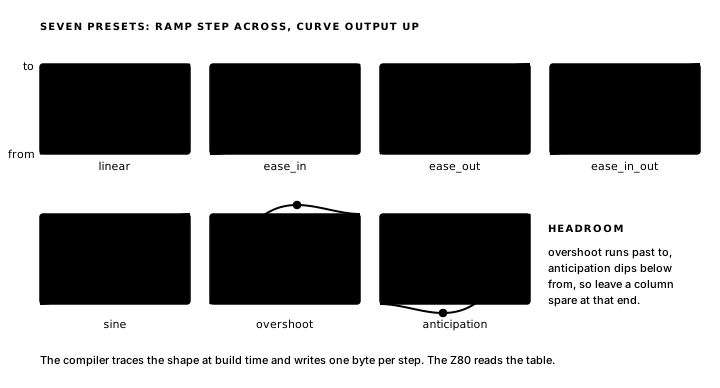
The ramp is the clock, the curve is the path
Comet's motion is built on an idiom you will use in every game from here. The two declarations are sized to each other:
ramp Travel : byte steps 64 -> Landed

curve Glide ease_out steps 64 from 0 to 6
The ramp keeps time by recording the flight's progress in frames. The curve table holds the corresponding column for each step. TrackComet joins them, clock in and path out, with one byte read per step. This separation lets one clock drive any motion curve.
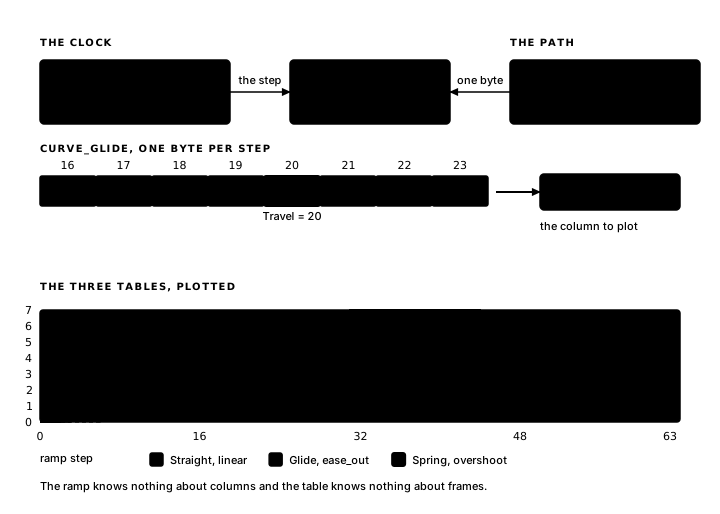
Sixty-four ramp steps index sixty-four table entries; the final step reads the final byte, so the dot stands on its landing column on the very frame Landed fires.
Duration is the steps count in frames: setting both numbers to 128 makes the same glide take twice as long. The preset name controls its character; changing ease_out to sine and rebuilding gives the same 64-frame flight a different motion. Either way, the block joining them stays untouched.
The table in the generated file
In comet.main.asm, the declaration has become this resource:
; --- curve resources ---
        .align  256
Curve_Glide:
        .db     0, 0, 0, 1, 1, 1, 1, 1, 1, 2, 2, 2, 2, 2, 2, 3
        .db     3, 3, 3, 3, 3, 3, 3, 4, 4, 4, 4, 4, 4, 4, 4, 4
        .db     5, 5, 5, 5, 5, 5, 5, 5, 5, 5, 5, 5, 5, 6, 6, 6
        .db     6, 6, 6, 6, 6, 6, 6, 6, 6, 6, 6, 6, 6, 6, 6, 6
Sixty-four bytes, one per ramp step, and you can read the ease-out straight off the rows: the dot spends three frames on column 0 and nineteen on column 6, each dwell longer than the last, give or take a rounding step.
.align 256, the line above the label, moves the assembler to the next 256-byte page boundary before laying the table down, so Curve_Glide starts at an address whose low byte is zero: a page-aligned table. A curve holds at most 256 bytes, every entry is in the same page as the base, and the base's low byte is zero, so base plus step collapses into writing the step straight into L:
    ld a,(Travel)
    ld l,a              ; page-aligned table: the step is the low byte
    ld a,(hl)
With a table base already in HL, three instructions read the path, DE untouched.
Switching curves in flight
Naming each motion lets the program select a curve at runtime. The complete Comet defines three curves over the same run, stores the current choice in Preset and cycles through them with PLUS. GO launches the comet, and PLUS switches presets so their different paths become visible.
program Comet

platform tec1g-mon3
display matrix8x8

state CometX : byte = 0 changed
state Preset : byte = 0 changed

pulse Go
pulse Landed
pulse Switch

ramp Travel : byte steps 64 -> Landed

curve Straight linear    steps 64 from 0 to 6
curve Glide    ease_out  steps 64 from 0 to 6
curve Spring   overshoot steps 64 from 0 to 6

bind key KEY_GO   rising -> Go
bind key KEY_PLUS rising -> Switch

effect Launch
    on Go
    updates Travel
begin
    xor a
    ld (Travel),a       ; rewind the ramp: the flight begins
end

effect NextPreset
    on Switch
    updates Preset
begin
    ld a,(Preset)
    inc a
    cp 3
    jr c,_store         ; past the last preset: back to the first
    xor a
_store:
    ld (Preset),a
end

compute TrackComet
    on Travel, Preset
    updates CometX
begin
    ld hl,Curve_Straight
    ld a,(Preset)
    or a
    jr z,_index
    ld hl,Curve_Glide
    dec a
    jr z,_index
    ld hl,Curve_Spring
_index:
    ld a,(Travel)
    ld l,a              ; page-aligned table: the step is the low byte
    ld a,(hl)
    ld (CometX),a
end

render DrawComet
    on CometX
begin
    call FbClear
    ld a,(CometX)
    ld b,a
    ld c,3
    ld a,COLOR_WHITE
    call FbPlot
end

render ShowPreset
    on Preset
begin
    ld a,(Preset)
    inc a               ; show 1..3, matching the list above
    ld l,a
    ld h,0
    call HudWriteU16
end
The three curve lines differ in one word each: Straight is the reference, Glide the soft arrival, Spring the overshoot. Preset is an ordinary fact holding 0, 1 or 2, and changed puts its number on the seven-segment display from the first frame; NextPreset cycles it, with cp 3 carrying the curve count. ShowPreset adds one so the display reads 1 to 3, matching the order the curves are declared in.
TrackComet now opens with a selection:
    ld hl,Curve_Straight
    ld a,(Preset)
    or a
    jr z,_index
    ld hl,Curve_Glide
    dec a
    jr z,_index
    ld hl,Curve_Spring
_index:
A chain of loads leaves HL holding the base of whichever table Preset names, and from _index the page-alignment idiom finishes the lookup. Every curve table is page-aligned, so one ld l,a serves all three. Selecting a motion at runtime adds a few loads and branches before the same single table read.
Here is Spring in the generated file, the numbers behind the feel:
        .align  256
Curve_Spring:
        .db     0, 0, 1, 1, 2, 2, 2, 3, 3, 3, 4, 4, 4, 4, 5, 5
        .db     5, 5, 5, 5, 6, 6, 6, 6, 6, 6, 6, 6, 6, 6, 6, 7
        .db     7, 7, 7, 7, 7, 7, 7, 7, 7, 7, 7, 7, 6, 6, 6, 6
        .db     6, 6, 6, 6, 6, 6, 6, 6, 6, 6, 6, 6, 6, 6, 6, 6
Halfway through the flight the dot climbs onto column 7, the spare column the headroom rule kept free, holds it for thirteen frames, then settles back onto 6 for the landing. All three tables end on 6, so pressing PLUS while the comet is stationary redraws it at its current position.
On the very first frame, Preset is already changed, so TrackComet runs before any launch, reads the idle ramp's final step, and the dot appears on its landing column until GO is pressed. TrackComet triggers on Travel, Preset, so a switch lands on the next update. A press of PLUS during a flight makes the dot jump to the new path's position at the same step, then finishes the journey on the new curve. Launch under preset 1 and you are watching this chapter's opening motion again, equal dwell on every column. Preset 2 glides in; preset 3 springs past and settles.
The next chapter adds a body, sound and a scoreboard to the comet: Shapes, Sound and Displays on the Board.
Exercise
Reading the curve. When Travel is 31, which column does Curve_Glide give to CometX, and what do the repeated values near the end of the table tell you about an ease-out motion?