Arrays and Layout Types
Every game so far has stored its state in a handful of named bytes. Larger structures also need representation in memory: the picture in a painting program, the wall of settled pieces in a falling-block game, the body of a snake: each of those is many related bytes that persist together, change together, and redraw together. Glimmer can treat such a structure as one fact.
Choosing which values to store is one design decision. Another is the shape those values take in memory. You could declare sixty-four separate cells, but Glimmer's limit of 32 flag-carrying cells means a board of one-byte facts would overflow the change banks before the program drew a pixel. It would also give the wrong change granularity: stamping one pixel changes the picture, so its render needs one name and one flag.
So this chapter adds the two declarations that model group facts. Array state reserves a run of bytes under one name and one flag. Layout types name an arrangement of fields, so that bytes which form one record, such as an x and y or a piece's origin and colour, share one declaration.
Canvas
Canvas is a painting program. Keys 2, 4, 6, and 8 steer a white cursor around the 8x8 RGB LED matrix; GO stamps a green pixel where the cursor stands; the stamped pixels stay put while the cursor moves on. That last clause is new in this book: every program until now kept its facts (a position, a colour and a score) but redrew its complete picture from them each time, so everything you saw came fresh from the facts behind it. In Canvas the picture is the state, so it persists after the cursor moves. The picture is an eight-byte array, and the cursor is a two-field layout called Point.
program Canvas

platform tec1g-mon3
display matrix8x8

type Point
    x : byte
    y : byte
end

state Cursor  : Point changed
state Picture : byte[8] changed

pulse Up
pulse Down
pulse Left
pulse Right
pulse Paint

bind key KEY_2 held period 8 -> Up
bind key KEY_8 held period 8 -> Down
bind key KEY_4 held period 8 -> Left
bind key KEY_6 held period 8 -> Right
bind key KEY_GO rising -> Paint

effect MoveUp
    on Up
    updates Cursor
begin
    ld a,(Cursor + offset(Point, y))
    or a
    jr z,_stop      ; at the top edge: stay
    dec a
    ld (Cursor + offset(Point, y)),a
_stop:
end

effect MoveDown
    on Down
    updates Cursor
begin
    ld a,(Cursor + offset(Point, y))
    cp 7
    jr nc,_stop     ; at the bottom edge: stay
    inc a
    ld (Cursor + offset(Point, y)),a
_stop:
end

effect MoveLeft
    on Left
    updates Cursor
begin
    ld a,(Cursor + offset(Point, x))
    or a
    jr z,_stop      ; at the left edge: stay
    dec a
    ld (Cursor + offset(Point, x)),a
_stop:
end

effect MoveRight
    on Right
    updates Cursor
begin
    ld a,(Cursor + offset(Point, x))
    cp 7
    jr nc,_stop     ; at the right edge: stay
    inc a
    ld (Cursor + offset(Point, x)),a
_stop:
end

effect PaintPixel
    on Paint
    updates Picture
begin
    ld a,(Cursor + offset(Point, x))
    call MxMask     ; A = the column's pixel mask
    ld b,a
    ld a,(Cursor + offset(Point, y))
    ld e,a
    ld d,0
    ld hl,Picture
    add hl,de       ; HL -> the cursor's row byte
    ld a,(hl)
    or b
    ld (hl),a
end

render DrawCanvas
    on Picture, Cursor
begin
    call FbClear
    ld hl,Picture
    ld de,Framebuffer + 1        ; green plane of row 0
    ld b,8
_row:
    ld a,(hl)
    ld (de),a       ; one row mask -> one green row
    inc hl
    inc de
    inc de
    inc de
    inc de          ; next row: 4 bytes per row
    djnz _row
    ld a,(Cursor + offset(Point, x))
    ld b,a
    ld a,(Cursor + offset(Point, y))
    ld c,a
    ld a,COLOR_WHITE
    call FbPlot
end
A running Debug80 build provides a canvas on which GO paints at the current cursor position.
One fact, eight bytes
state Picture : byte[8] changedbyte[N] reserves N bytes of state under one name, with N anywhere from 1 to 256. An array starts zero-filled and takes no initializer, so the declaration reads directly: Picture is eight bytes, already changed.
One change flag covers the whole run. Stamping a pixel changes the picture. A board changes as a unit, and the render tests one flag to determine whether it must redraw. Per-cell flags would use the flag budget to track individual bytes. updates Picture raises the one flag whichever byte a block wrote, and on Picture fires when any byte did. The array name is legal exactly where a byte cell's name is legal, in on lines and in updates lines, and it uses one bit of Changed0.
Eight bytes hold sixty-four pixels because each byte is a row mask: one row of the 8x8 matrix, one bit per column, bit 7 the leftmost. The MxMask library helper takes a column number in A and returns the column's mask in A, clobbering B on the way.
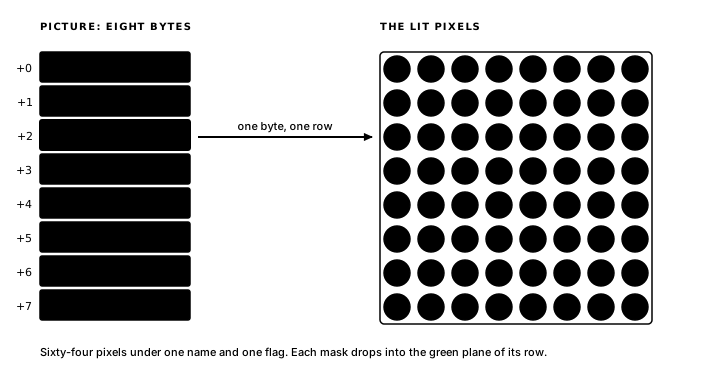
Painting a pixel
Stamping a pixel means finding one byte in the array and setting one bit in it. PaintPixel does both:
effect PaintPixel
    on Paint
    updates Picture
begin
    ld a,(Cursor + offset(Point, x))
    call MxMask     ; A = the column's pixel mask
    ld b,a
    ld a,(Cursor + offset(Point, y))
    ld e,a
    ld d,0
    ld hl,Picture
    add hl,de       ; HL -> the cursor's row byte
    ld a,(hl)
    or b
    ld (hl),a
end
This addressing is the Z80 you already know: Picture is a label, the row number goes in DE, add hl,de lands HL on the row's byte, and OR folds the new pixel into whatever the row already held. Glimmer supplies the label, the storage behind it and the flag that updates Picture raises; the arithmetic between them remains hand-written, instruction by instruction. GO fires Paint, the logic phase runs PaintPixel, and Picture's change is delivered to the render phase later the same frame. One press of GO therefore produces one visible pixel in one frame.
Redrawing the picture
DrawCanvas depends on both facts (on Picture, Cursor) so a stamp and a move each trigger a redraw. Redrawing means rebuilding the complete frame from state with one loop:
    ld hl,Picture
    ld de,Framebuffer + 1        ; green plane of row 0
    ld b,8
_row:
    ld a,(hl)
    ld (de),a       ; one row mask -> one green row
    inc hl
    inc de
    inc de
    inc de
    inc de          ; next row: 4 bytes per row
    djnz _row
The framebuffer gives each row four bytes (red, green, blue, and an aux byte) so the loop drops each of Picture's row masks into the green plane and steps DE by four to reach the next row. Because Picture and the framebuffer share the row-mask convention, the complete painting transfers in one eight-pass loop. The cursor goes on top afterwards, white, through FbPlot. On a painted pixel the cursor shows white; after it moves away, the next redraw restores the green underneath.
Two bytes that travel together
The cursor is one fact with two parts: an x and a y that move together and change together. Glimmer models it with a layout type and a typed state cell:
type Point
    x : byte
    y : byte
end

state Cursor : Point changed
A type declaration names an arrangement of bytes: Point is two byte fields, x at the start and y after it. The name describes a shape. The state line reserves the storage and reads Cursor is a Point, already changed and reserves two zero-filled bytes in that shape.
Typed state follows the array rules: zero-filled, one change flag for the whole cell. Zero-filled has a visible consequence here: Cursor starts as (0,0), so the program opens with the cursor in the top-left corner. And the single flag is what lets every movement effect say updates Cursor and the render say on Cursor, whichever field moved.
Inside a block, a field is reached by adding its offset to the cell's label. Every load and store in the movement effects takes this shape:
ld a,(Cursor + offset(Point, y))offset(Point, y) is a constant computed at assemble time (1, since y sits one byte into the layout), so the complete operand folds to a fixed address and the instruction is a plain absolute load. You could write Cursor + 1 and reach the same byte today. Using offset keeps the address tied to the field definition. If a field is added at the top, the assembler adjusts each later address instead of leaving hand-counted offsets pointing at the wrong bytes.
Layout fields
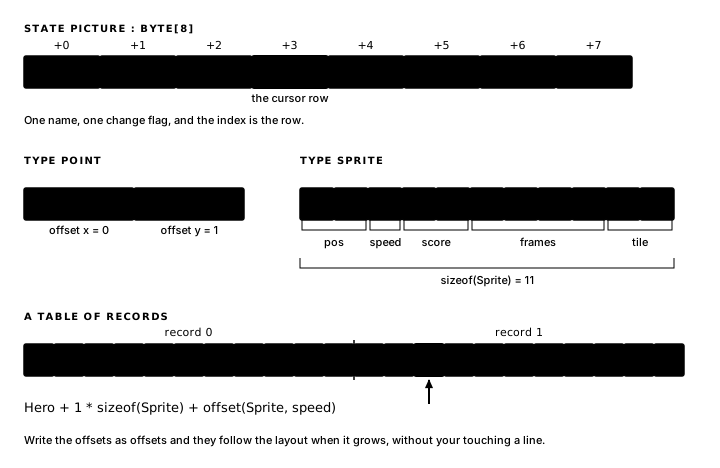
Point is a small layout. Fields come in five kinds, and a game piece shows them all:
type Sprite
    pos    : Point
    speed  : byte
    score  : word
    frames : 4
    tile   : addr
end
byte and word you know. addr is a two-byte field that holds an address: a pointer to a shape table, a curve, a routine. A bare number reserves that many raw bytes, so frames : 4 is a four-byte scratch run with one name. And a field can be another type: pos : Point nests the two-byte layout inside this one.
Two functions read a layout's measurements inside any block body. sizeof(Name) is the layout's full size (sizeof(Point) is 2, sizeof(Sprite) is 11), which is what you multiply by to step through a table of records. offset(Type, field) is a field's distance from the start, and nested fields chain by addition:
ld hl,Hero + offset(Sprite, pos) + offset(Point, y)Both are constants by the time the Z80 sees them; the instruction above assembles to one ld hl,nn.
A type can also rename an existing shape:
type Board = byte[8]

state Grid : Board
The alias form gives a shape a reusable name, so a program with three boards declares Board once and sizeof(Board), 8 here, follows the definition. State declared through an alias is typed state like any other: zero-filled, one flag.
The declarations, compiled
In canvas.main.asm, two short sections show the generated forms of the new declarations. First, the layout:
; --- layout types ---
; AZM owns the type system: sizeof, offset, and layout casts
; work on these names in block bodies.
Point .type
    x             .byte
    y             .byte
.endtype
type Point compiled to an assembler .type record, field names and byte widths carried straight through. The generated comment records the division of labour: Glimmer emits the layout, and the assembler evaluates its type operations. sizeof and offset work inside your blocks because they are assembler expressions, evaluated over this record when the generated file assembles. The alias form compiles to the matching directive, from the Board example's generated file:
Board .typealias byte[8]Then the storage:
; --- state storage ---
Cursor:           .ds Point, 0   ; typed state
Picture:          .ds 8, 0   ; byte array
.ds Point, 0 reserves sizeof(Point) bytes of zeroes; .ds 8, 0 reserves the array. These are the same storage idea at a larger size: a label, a reservation and zero-filled bytes.
And the change tracking confirms what the declarations promised. Two cells, two bits:
CHG_CURSOR        .equ %00000001
CHG_PICTURE .equ %00000010Changed0: .db %00000011 ; flags dispatch testsTen bytes of program state, two flags, and both marked changed so DrawCanvas paints the opening frame: the blank picture, the cursor in its corner.
The next chapter uses Canvas to develop a method for reading dependency reports, interpreting warnings and debugging a reactive program: Dependency Reports and Debugging.
Exercise
One array, one change. How many bytes and change bits does state Picture : byte[8] changed use, and why does changing one row cause DrawCanvas to redraw the complete picture?