Time
Every program so far changes state only after keypad input. Mover's dot remains at the position set by the last press, and Meter's bar holds its level until plus or minus changes it. While the keypad is idle, the profile continues scanning the display and polling the keypad, but every change flag remains clear and the dispatcher skips each reactive block.
Many games also change with time: a drop falls, a ghost patrols or a fuse burns down while the player hesitates. The programs so far have used the keypad as their only source of moments. This chapter adds moments generated from frame counts.
The runtime frame scans the 8x8 RGB LED matrix, polls the keypad, runs whatever changed, and comes around again for as long as the power holds. Every turn of that loop is a beat. Glimmer provides three ways to schedule moments against those beats: a built-in frame counter, timers and ramps. Our program is Drip: a drop that falls on a schedule, blinks as it falls and falls faster the longer the program runs. Drip takes all its moments from clocks.
Every frame
The smallest schedule is a block that runs on every single frame.
program Ticks

platform tec1g-mon3
display matrix8x8

render ShowFrames
    on FrameCount
begin
    ld a,(FrameCount)
    ld l,a
    ld h,0
    call HudWriteU16
end
FrameCount is built in, a byte cell any Glimmer program may name straight away. Each frame, before the phases run, the runtime increments it and marks it changed, so a block with on FrameCount runs every frame, reading a value that climbs 0, 1, 2, and wraps past 255 back to 0.
In a running build, the seven-segment display counts the frames. Each count is one full turn of the loop: one scan of the 8x8 matrix, one poll, one pass through your blocks. That pace is the fastest schedule a Glimmer program has.
Flag bits are limited to 32 flag-carrying cells. FrameCount takes a bit only in a program that names it. Ticks includes that bit; Drip uses other schedules.
For motion, the every-frame schedule is often too fast. A drop stepping one row per frame falls off an eight-row board in eight frames. Mover stepped once every eight frames; eight steps in eight frames is a flash. Game tempo is every N frames, with N yours to choose and, since games change difficulty, yours to change while the program runs.
A drop on a schedule
The first version of Drip falls one row at a time and starts over from the top after leaving the bottom.
program Drip

platform tec1g-mon3
display matrix8x8

state DropY : byte = 0 changed

pulse FallTick

timer Fall : byte = 24 -> FallTick

effect Descend
    on FallTick
    updates DropY
begin
    ld a,(DropY)
    inc a
    cp 8
    jr c,_store     ; still on the board
    xor a           ; past the bottom: back to the top
_store:
    ld (DropY),a
end

render DrawDrop
    on DropY
begin
    call FbClear
    ld a,(DropY)
    ld c,a          ; C = y
    ld b,3          ; B = x, the middle column
    ld a,COLOR_BLUE
    call FbPlot
end
One declaration is new:
timer Fall : byte = 24 -> FallTickSpoken aloud, the declaration says: Fall is a byte timer with period 24, firing FallTick. A timer is an oscillator that fires every N frames, forever. Behind the name sits a hidden countdown that loses one on every frame; the frame it reaches zero, the timer fires its pulse and the countdown reloads from Fall to begin the next cycle.
FallTick behaves exactly like a pulse from a key binding: it is declared with the same word and consumed the same way. Descend follows the same rule pattern: on a moment, change a fact. If a bind line pointed at FallTick instead, the same block would run per keypress. Blocks depend on the pulse rather than its source, so changing the declaration that fires it retunes the schedule.
Timer ticking happens immediately after the keypad poll and before any phase runs, so a pulse fired by a timer is seen by every block in the same frame, and clears at the end of the frame like every pulse.
The cell named Fall is the period, and it is ordinary writable state: a block that lists updates Fall and stores a new value has changed the tempo from the next reload on. One distinction to keep straight: a timer announces itself through its pulse, so Fall may stand in updates lines, and on lines take FallTick.
A blink
A steady pixel can be hard to distinguish from a static display element. Blinking the drop adds one timer and one fact:
state Visible : byte = 1timer Fall : byte = 24 -> FallTick
timer Blink : byte = 5 -> BlinkTickeffect Twinkle
on BlinkTick
updates Visible
begin
ld a,(Visible)
xor 1
ld (Visible),a
endEvery fifth frame, Twinkle flips Visible between 1 and 0. DrawDrop's trigger grows to on DropY, Visible, so the drop redraws when it moves and when it blinks, and its body tests Visible before plotting: the dark half of the blink is a cleared framebuffer.
Each timer has a separate hidden countdown. Periods 24 and 5 drift in and out of step because the schedules are independent.
One shot
An oscillator fires forever, and some moments should arrive exactly once, after a delay: a grace period before a hazard arms, a pause before a restart. The question those moments ask is once, N frames from now, and the answer is one word added to the declaration:
timer Grace : word = 384 -> GraceOver onceWith once, the cell is the countdown itself. It loses one each frame, fires its pulse the frame it reaches zero, and then sits at zero, idle, until a block writes it. Each write arms exactly one firing:
ld hl,384
ld (Grace),hlword is the point here: a byte cell tops out at a 255-frame delay, and a word countdown runs to 65535. Drip runs on oscillators; delayed restarts and title screens use one-shots.
The climb
Drip still plays its hundredth descent at the pace of its first. To increase the difficulty on this board, the fall period should shrink as time passes. 24, then 20, then 16, down to a floor. That requires a long schedule between difficulty changes and an event when each interval ends. The schedule uses the last declaration introduced in this chapter, the ramp:
ramp Heat : byte steps 250 -> HeatUpSpoken aloud, it says: Heat is a ramp over 250 steps, firing HeatUp. Where a timer fires every N frames, forever, a ramp records progress from one value to another, step by step. Each frame, a ramp moves its cell one closer to steps - 1 and marks it changed. A block with on Heat can therefore run at every step. The step that reaches 249 fires the pulse, then the ramp remains idle at that value. Writing 0 to the cell starts the complete climb again. Drip uses only the completion pulse; motion curves use the intermediate values.
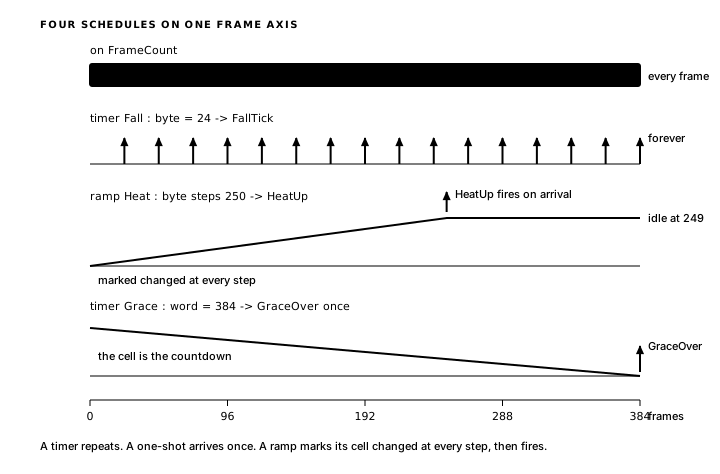
A ramp starts at its terminal value and remains idle until code writes a lower value. A familiar modifier triggers that first write:
state Boot : byte = 0 changedeffect Ignite
on Boot
updates Heat
begin
xor a
ld (Heat),a ; start the first climb
endBoot changes only at startup, so Ignite runs exactly once, on the first frame. The same modifier that draws a first-frame picture can also fire a first-frame rule.
Quicken handles the completion pulse. Here is the complete program:
program Drip
platform tec1g-mon3
display matrix8x8
state DropY : byte = 0 changed
state Visible : byte = 1
state Boot : byte = 0 changed
pulse FallTick
pulse BlinkTick
pulse HeatUp
timer Fall  : byte = 24 -> FallTick
timer Blink : byte = 5  -> BlinkTick
ramp Heat : byte steps 250 -> HeatUp
effect Ignite
on Boot
updates Heat
begin
xor a
ld (Heat),a ; start the first climb
end
effect Descend
on FallTick
updates DropY
begin
ld a,(DropY)
inc a
cp 8
jr c,_store ; still on the board
xor a ; past the bottom: back to the top
_store:
ld (DropY),a
end
effect Twinkle
    on BlinkTick
    updates Visible
begin
    ld a,(Visible)
    xor 1
    ld (Visible),a
end
effect Quicken
on HeatUp
updates Fall, Heat
begin
ld a,(Fall)
cp 8
jr c,_floor ; fast enough: hold the pace
sub 4
ld (Fall),a ; the next reload counts from here
_floor:
xor a
ld (Heat),a ; rewind the climb
end
render DrawDrop
on DropY, Visible
begin
call FbClear
ld a,(Visible)
or a
jr z,_done ; the blink's dark half: leave the matrix clear
ld a,(DropY)
ld c,a ; C = y
ld b,3 ; B = x, the middle column
ld a,COLOR_BLUE
call FbPlot
_done:
endIn Quicken's body, difficulty is an ordinary sub 4 and a store into Fall, the same write any effect makes to any state, and the timer's next reload counts from the new period. The cp 8 holds a floor (periods run 24, 20, 16, 12, 8, then settle at 4), and the final store rewinds Heat to begin the next 250-frame climb.
In a running build, the drop crawls down the middle column, blinking as it goes, and wraps back to the top. Around its second descent the pace picks up, then again at the top of every climb, until it settles into a quick steady drip. Speed, blink and difficulty each add one declaration and one small rule.
The program, as a report
Drip is the first program whose moments come from three different places, and its dependency report shows all three:
glimmer --deps drip.glimprogram Drip
DropY : state byte
raised by: Descend
triggers: DrawDrop (render)
Visible : state byte
raised by: Twinkle
triggers: DrawDrop (render)
Boot : state byte
raised by: (nothing)
triggers: Ignite (logic)
FallTick : pulse
raised by: timer Fall
triggers: Descend (logic)
BlinkTick : pulse
raised by: timer Blink
triggers: Twinkle (logic)
HeatUp : pulse
raised by: ramp Heat
triggers: Quicken (logic)
Fall : timer
raised by: Quicken
triggers: (nothing)
Blink : timer
raised by: (nothing)
triggers: (nothing)
Heat : ramp
raised by: Ignite, Quicken
triggers: (nothing)The schedules appear in the graph beside the other declarations: raised by: timer Fall and raised by: ramp Heat read exactly like the key lines in Meter's report, because a moment is a moment wherever it comes from. Fall shows raised by: Quicken and triggers: (nothing), because its writes reach the hidden countdown while FallTick triggers the blocks. Boot, raised by nothing, appears because the declaration marks it changed at startup.
Inside GlimTickTimers
The hidden countdown is a labelled byte in the generated file. From drip.main.asm, the storage:
; --- state storage ---
DropY:            .db 0
Visible:          .db 1
Boot:             .db 0
FallTick:         .db 0
BlinkTick:        .db 0
HeatUp:           .db 0
Fall:             .db 24   ; period (writable)
Glim_Fall_cnt:    .db 24
Blink:            .db 5   ; period (writable)
Glim_Blink_cnt:   .db 5
Heat:             .db 249   ; ramp progress, idle at terminal
Changed0:         .db %00000101   ; flags dispatch tests
Glim_Fall_cnt is one byte sitting beside the period it reloads from, and Blink gets a countdown as well. Heat begins at 249, its terminal, idle until Ignite writes it. And Changed0 starts at %00000101, bits 0 and 2, the two cells you declared changed: DropY for the first picture, Boot for the first climb.
The loop shows where ticking occurs:
MainLoop:
        call    ScanFrame            ; show one full frame, then blank
        call    GlimPollBindings     ; game work runs in the blank window
        call    GlimTickTimers
        call    GlimRunLogicEffects
        call    GlimMergeRaised
        call    GlimRunRenderEffects
        call    GlimEndFrame
        jp      MainLoop
GlimTickTimers runs after the poll and before every phase, and that placement is why a timer's pulse reaches its consumers in the frame it fires. The routine itself opens with Fall:
; --- timers, ramps, frame counter ---
.routine
GlimTickTimers:
        ld      a,(Glim_Fall_cnt)
        dec     a
        ld      (Glim_Fall_cnt),a
        jr      nz,_next_Fall
        ld      a,(Fall)       ; reload from period cell
        ld      (Glim_Fall_cnt),a
        ld      a,1
        ld      (FallTick),a
        ld      a,(Changed0)
        or      CHG_FALLTICK
        ld      (Changed0),a
_next_Fall:
The counter decrements and is stored. On the zero frame, the code reloads it from Fall, sets the pulse byte and ORs the pulse's flag straight into Changed0. That direct write distinguishes the tick from the blocks you write, which raise through Raised0 or Next0 because some consumers may already have run. The tick runs before all of them, so a direct delivery still reaches every consumer exactly once.
Further down, the ramp:
        ld      a,(Heat)
        cp      249
        jr      nc,_next_Heat           ; idle at terminal
        inc     a
        ld      (Heat),a
        ld      a,(Changed0)
        or      CHG_HEAT
        ld      (Changed0),a
        ld      a,(Heat)
        cp      249
        jr      nz,_next_Heat
        ld      a,1                  ; arrived: fire completion
        ld      (HeatUp),a
        ld      a,(Changed0)
        or      CHG_HEATUP
        ld      (Changed0),a
_next_Heat:
        ret
The first compare is the idle test: at 249 the ramp section falls through. Below it, each moving frame steps the cell and marks CHG_HEAT (the per-step change flag a ramp cell carries and a timer cell lacks), and the step that lands on 249 also fires HeatUp. When Quicken stores 0, the idle test fails on the next tick and the climb resumes.
Quicken's header says updates Fall, Heat, and the generated raise after its body covers Heat alone:
        ld      a,(Raised0)          ; deliver to later phases this frame
        or      CHG_HEAT
        ld      (Raised0),a
        ret
The body stores the new period directly. updates Fall records that write in the dependency report even though Fall carries no change flag.
GlimTickTimers is generated only when a program declares a timer or a ramp or names FrameCount.
Drip's drop falls in equal steps. The next chapter uses ramps to play back motion curves: Motion Curves.
Exercise
Independent timers. If Fall fires every 24 frames and Blink every 5 frames, on which frames do they first fire, and on which frame do they first fire together?