Compute, Effect, Render
Rover's blocks do two different jobs: five of them change facts, one of them draws. Games have a third job, quieter than either: facts computed from other facts. A score implies a difficulty. A count implies a bar length. A position implies which board cell the player occupies.
An effect applies a game rule when a moment arrives: move or stay at the wall, score or miss. A derivation calculates one fact from another. The bar length is always the count divided by eight: the same information in the form the display uses. These operations form three groups: effects change state in response to events, derivations calculate state and renders depict it. Glimmer gives each group a block keyword and runs them in a fixed order every frame.
Meter
The chapter's program is a level meter. Plus and minus raise and lower a count from 0 to 64; the count appears on the seven-segment display; and a green bar across the 8x8 RGB LED matrix shows the level, one pixel per eight counts.
program Meter

platform tec1g-mon3
display matrix8x8

state Count  : byte = 0 changed
state BarLen : byte

pulse IncP
pulse DecP

bind key KEY_PLUS  held period 6 -> IncP
bind key KEY_MINUS held period 6 -> DecP

effect Increase
    on IncP
    updates Count
begin
    ld a,(Count)
    cp 64
    jr nc,_stop     ; full: stay
    inc a
    ld (Count),a
_stop:
end

effect Decrease
    on DecP
    updates Count
begin
    ld a,(Count)
    or a
    jr z,_stop      ; empty: stay
    dec a
    ld (Count),a
_stop:
end

compute DeriveBar
    on Count
    updates BarLen
begin
    ld a,(Count)
    srl a
    srl a
    srl a           ; bar pixels = Count / 8
    ld (BarLen),a
end

render DrawBar
    on BarLen
begin
    call FbClear
    ld a,(BarLen)
    or a
    jr z,_done      ; empty bar: leave the matrix clear
    ld b,a          ; B = pixels still to light
_col:
    push bc
    ld a,b
    dec a
    ld b,a          ; B = x for this pixel
    ld c,3          ; C = y, the middle row
    ld a,COLOR_GREEN
    call FbPlot
    pop bc
    djnz _col
_done:
end

render ShowCount
    on Count
begin
    ld a,(Count)
    ld l,a
    ld h,0
    call HudWriteU16
end
One keyword in that file is new to you: compute. DeriveBar maintains a fact that follows from another fact, the bar length that Count implies. When Count's change reaches the compute phase, DeriveBar recalculates BarLen before the render phase begins. BarLen is ordinary state, and DrawBar depends on it as it would any other fact.
Three jobs, three keywords, one order
The first word of every block selects its phase. Each Glimmer frame runs those phases in a fixed order:
- compute blocks run first: state derived from changes available at the start of the phase, with updates ready for later phases.
- effect blocks run second: the game's rules, changing facts in response to moments.
- render blocks run last: facts turned into pictures after the frame's compute and effect passes.
A render block takes no updates line because it only depicts state, and the compiler rejects one if present. A compute block requires an updates line because it produces a fact. An effect runs between them, consuming moments and changing facts.
The order gives you a scheduling guarantee: each block runs at most once per frame, and one change reaches all its dependents together. When every dependent is in a later phase, they receive it this frame; otherwise they receive it at the next frame's start. A chain of derivations, a compute feeding a compute, therefore advances one step per frame, so a two-stage consequence reaches the screen two frames after its cause. A render runs after the compute and effect passes, and it reads live memory. Glimmer defines the trigger schedule; the Z80 bodies determine the values.
The complete runtime frame appears in meter.main.asm:
MainLoop:
        call    ScanFrame            ; show one full frame, then blank
        call    GlimPollBindings     ; game work runs in the blank window
        call    GlimRunDeriveEffects
        call    GlimMergeRaised
        call    GlimRunLogicEffects
        call    GlimMergeRaised
        call    GlimRunRenderEffects
        call    GlimEndFrame
        jp      MainLoop
Three dispatchers, one per phase, in job order, and between them the merge calls the next section is about.
Change propagation
The earlier generated loop handed Next0 into Changed0, with the purpose deferred until a program needed it. A block's updates line marks facts changed. One rule determines when dependents receive that change:
A change is delivered exactly once: to later phases in the same frame, otherwise in the next frame.
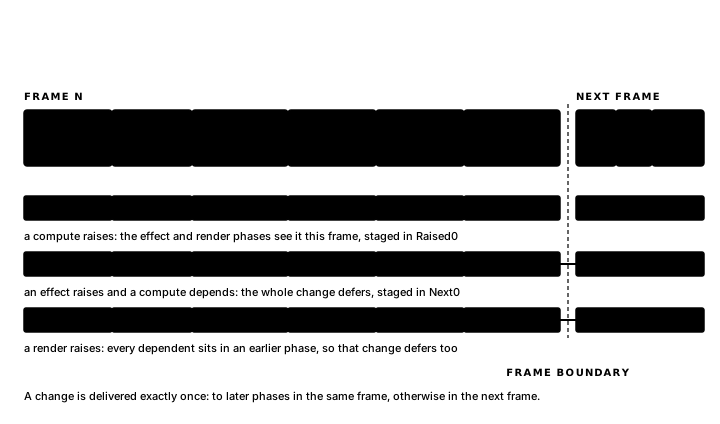
DeriveBar updates BarLen, and BarLen's one dependent is DrawBar, a render, which is a later phase. So the change is delivered the same frame: raise the bar with plus, and the compute that resizes it and the render that draws it happen in one frame.
An update from a later phase to an earlier one is delivered on the next frame. Increase updates Count, and Count has two dependents: ShowCount, a render, which runs later this frame, and DeriveBar, a compute, which ran before the logic phase this frame. Deliver to the render now and to the compute next frame, and you have split one change in two: digits showing the new count above a bar still sized for the old one. So Glimmer defers the change. Every dependent of Count sees it at the start of the next frame: once, together.
You can read both halves of the rule straight out of the generated wrappers; Meter is built so both variants appear in one file. After DeriveBar's body:
        ld      a,(Raised0)          ; deliver to later phases this frame
        or      CHG_BARLEN
        ld      (Raised0),a
        ret
After Increase's body:
        ld      a,(Next0)            ; a consumer already ran: defer to next frame
        or      CHG_COUNT
        ld      (Next0),a
        ret
Two staging bytes stand beside Changed0. Raised0 holds same-frame deliveries, and the GlimMergeRaised calls between phases fold it into Changed0 so the next phase sees it. Next0 holds deferred deliveries, and GlimEndFrame rolls it into Changed0 as the next frame begins.
Following a plus press one frame at a time shows the same rule from the input side. On the press frame, IncP fires, Increase runs and Count's change goes into Next0. On the following frame the change is in Changed0 from the start: DeriveBar runs and resizes BarLen (a same-frame delivery to a later phase), so DrawBar redraws the bar, and ShowCount rewrites the digits. A chain that points backward, logic feeding a compute, advances one step per frame.
The rule means phase alone determines when an update is delivered. Placing DeriveBar at the bottom of the file leaves every delivery on the same frame, so source order can group rules and renders for readability. This guarantee covers triggers. Block bodies are Z80 operating on live memory, and within one phase the dispatchers call blocks in file order, so two same-phase blocks that read and write the same cell directly can still see each other's work. Keeping one gameplay invariant inside one effect, or inside a routine it calls, avoids that order dependency.
The program, as a report
Glimmer can print the dependency chain traced through this chapter. The command line provides the report, and Appendix D covers its setup:
glimmer --deps meter.glimprogram Meter
Count : state byte
raised by: Increase, Decrease
triggers: DeriveBar (derive), ShowCount (render)
BarLen : state byte
raised by: DeriveBar
triggers: DrawBar (render)
IncP : pulse
raised by: key KEY_PLUS (held)
triggers: Increase (logic)
DecP : pulse
raised by: key KEY_MINUS (held)
triggers: Decrease (logic)For every fact, the report lists its sources, triggers and each dependent's phase. Glimmer computes those relationships from the on, updates and bind lines. When a program misbehaves, the report helps trace which fact should have changed before you open the debugger.
The next chapter examines the framebuffer, scanner and drawing routines in the 8x8 matrix profile.
Exercise
One press through the phases. Count and BarLen both begin at zero. When PLUS is pressed on frame N, when do Count, BarLen, the digits and the bar change, and why does the visible update wait until frame N+1?