Shapes, Sound and Displays on the Board
Every picture so far has been built from single calls to FbPlot: a dot, a drop, a bar of pixels in a loop. Once a game's character has a body, two pixels by two or a complete 8x8 figure, plotting it point by point inside every render block drowns the picture in the code that draws it. A data declaration can show the shape directly.
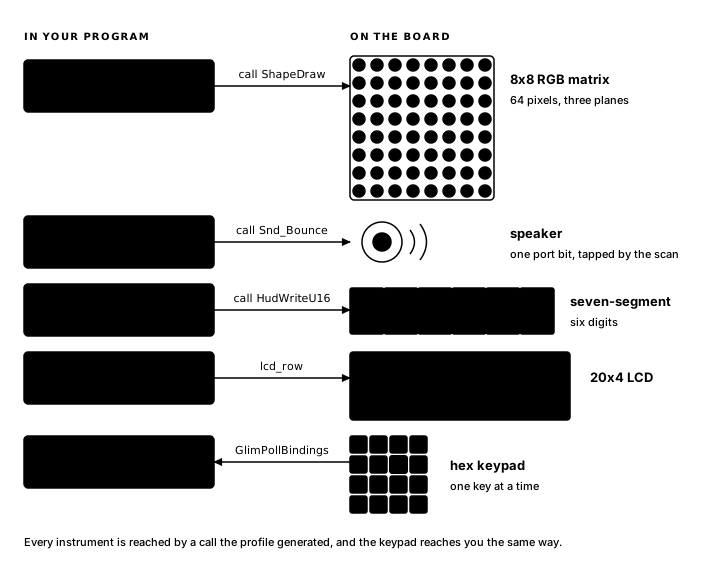
The TEC-1G also has a speaker, the six-digit seven-segment display and the 20x4 LCD, all mounted beside the 8x8 RGB LED matrix and all reachable from a block. When your character hits a wall, the player should hear it: a beep placed at the right instant is feedback, the kind a player responds to by reflex. When the score changes, the player should be able to read it at a glance. This chapter covers shapes, sound cues, the score display and LCD text.
The same pattern appears three times in this chapter. You declare a resource in the .glim file (a shape, a sound cue, a text string) and Glimmer generates the data plus something callable to go with it. Your blocks call what was generated, and the declaration reads like the resource it describes. The scoreboard is the odd one out: the six-digit seven-segment display is a service the profile library provides through two routines you call directly.
Fanfare
A cyan spark, two pixels square, bounces around the 8x8 matrix on a dedicated timer. Every wall hit reverses its direction, beeps the speaker, and adds one to a score on the six-digit seven-segment display. The 20x4 LCD announces the program from the first frame.
program Fanfare

platform tec1g-mon3
display matrix8x8

shape Spark color cyan
  "XX"
  "XX"
end

sound Bounce len 8 div 3

text MsgHello "FANFARE"

state SparkX : byte = 3 changed
state SparkY : byte = 2
state VelX   : byte = 1
state VelY   : byte = 1
state Score  : word = 0 changed
state Banner : byte = 0 changed

pulse Tick

timer Step : byte = 6 -> Tick

effect Move
    on Tick
    updates SparkX, VelX, SparkY, VelY, Score
begin
    ; step x, bounce off columns 0 and 6
    ld a,(VelX)
    ld b,a
    ld a,(SparkX)
    add a,b
    ld (SparkX),a
    or a
    jr z,_hitx      ; left wall
    cp 6
    jr nz,_xdone    ; open board: no bounce
_hitx:
    ld a,(VelX)
    neg
    ld (VelX),a
    ld hl,(Score)
    inc hl
    ld (Score),hl
    call Snd_Bounce
_xdone:
    ; step y, bounce off rows 0 and 6
    ld a,(VelY)
    ld b,a
    ld a,(SparkY)
    add a,b
    ld (SparkY),a
    or a
    jr z,_hity      ; top wall
    cp 6
    jr nz,_ydone
_hity:
    ld a,(VelY)
    neg
    ld (VelY),a
    ld hl,(Score)
    inc hl
    ld (Score),hl
    call Snd_Bounce
_ydone:
end

render DrawSpark
    on SparkX, SparkY
begin
    call FbClear
    ld a,(SparkX)
    ld b,a          ; B = x
    ld a,(SparkY)
    ld c,a          ; C = y
    ld hl,Shape_Spark
    call ShapeDraw
end

render ShowScore
    on Score
begin
    ld hl,(Score)
    call HudWriteU16
end

render Greet
    on Banner
begin
    lcd_row MsgHello, LcdRow1
end
In a running build, the spark ricochets and each wall contact raises the score and starts or restarts the chirp. A corner raises the score twice, but the second sound call replaces the first, leaving one active cue.
Only three declarations at the top are new (shape, sound, and text) and each has a section below. A timer fires Tick every 6 frames, and Move runs on Tick. Velocity is stored as a fact. VelX holds 1 when the spark travels right and $FF when it travels left, and because adding $FF to a byte steps it down by one, a single add moves the spark whichever way it is going. After the step, a spark at column 0 or column 6 has an edge against a wall (the shape is 2 wide, so 6 is as far right as it fits), and the rule performs three operations: negate the velocity, increment the score word and start the sound cue. The same operations then run for y.
A shape is pixel art with a name
Here is the spark's body again:
shape Spark color cyan
  "XX"
  "XX"
end
A shape declares a bitmap you can read at a glance: quoted rows, X for a lit pixel, . for an empty one. Rows are rectangular, anywhere from 1x1 up to 8x8, and the colour is one of the 8x8 matrix's seven: red, green, blue, yellow, cyan, magenta, white. When you want a tall cross, three wide and four high, you draw one:
shape Cross color red
  ".X."
  "XXX"
  ".X."
  ".X."
end
The source preserves the picture at the scale used to design it, so the cross remains visible as a cross rather than an encoded mask.
From each shape Glimmer emits a data table named Shape_<Name>, and because at least one shape exists in the program, the profile library gains ShapeDraw, the routine that paints any of them. Its interface is three registers:
ld hl,Shape_Spark
ld b,3           ; x
ld c,2           ; y
call ShapeDraw
ShapeDraw ORs each lit pixel's colour bits into the framebuffer, so lit pixels land on top of whatever is already there and empty pixels leave it alone; two overlapping shapes combine. DrawSpark starts with FbClear because a moving shape redraws from a clean board.
The calling block is responsible for placement: ShapeDraw plots every lit pixel at x plus column, y plus row, straight into the framebuffer, and a row that hangs off the board writes into whatever memory follows it. The complete shape must stay inside the 8x8 matrix. For the 2x2 spark that means x and y each stay in 0..6, which is exactly the range Move enforces with its bounce tests. Register hygiene matters here too: the generated contract line declares that ShapeDraw clobbers A, BC, DE and HL. DrawSpark therefore loads its arguments immediately before the call.
Sound the scan plays
sound Bounce len 8 div 3A sound declares a cue: a short beep that plays while your blocks keep running. The two numbers describe duration and pitch. The speaker is a port bit controlled by the CPU. Glimmer integrates sound with the scan loop that keeps the 8x8 matrix lit: once per row, 8 ticks per frame, the service updates the speaker output. len counts those ticks (len 8 sounds for about one frame) and div sets the pitch as a divider, with smaller values higher.
A cue plays while the frames keep coming, and its vocabulary is short and rhythmic by nature: clicks, chirps, buzzes, down to a long low len 200 div 9 at the mournful end of the range. Melody is a different trade: MON-3 can play a tune, but it holds the CPU for the duration, so game execution pauses until the tune ends.
Each cue compiles to a routine named Snd_<Name>, called with no arguments:
call Snd_BounceThe call starts the cue and returns at once; the scan plays it out over the following frames while your blocks keep running. One cue is active at a time, and starting a new cue replaces the current one; a fresh wall hit restarts the chirp from its first tick.
Sound accompanies a moment, so call Snd_Bounce sits inside the effect on the branch where the wall hit occurred. The other branch continues without starting a cue.
The score, on the seven-segment display
The six-digit seven-segment display is the board's number instrument, and the same scan that serves the speaker serves it too: one digit per row tick, refreshed forever. The profile library drives it with two routines:
HudWriteU16: HL = value, shown as five decimal digits after a fixed leading zero, 0 to 65535.HudBlankDig: clear all six digits.
Score is a word, so ShowScore loads all sixteen bits into HL:
render ShowScore
    on Score
begin
    ld hl,(Score)
    call HudWriteU16
end
The startup code Glimmer generates calls FbClear and HudBlankDig before the first frame, so both displays begin dark; Score is declared changed, so ShowScore runs on frame one and the score shows zero rather than remaining blank.
Move's header lists every fact the block may change, and each listed fact is marked changed whenever the block runs, so ShowScore repaints its digits every step, quiet ticks included. The repaint writes the same six glyph bytes and takes a few dozen cycles in the blank window. When a score changes rarely and its redraw is heavy, move the heavy fact into a separate effect so only a real change raises it; when the redraw is HudWriteU16, the broad updates makes the dependency easier to read.
Words on the LCD
text MsgHello "FANFARE"A text declares a zero-terminated string for the TEC-1G's 20x4 LCD. The board provides the LCD alongside the keypad, so text resources work the same on the 8x8 matrix and, later in the book, on the TMS9918. Writing a string to a row is one line in a block:
lcd_row MsgHello, LcdRow1That one line introduces an AZM op. An op is an assembler macro: a named instruction sequence defined once in the generated file and expanded inline wherever it is invoked. So lcd_row reads like an instruction and costs exactly what its body costs. Glimmer emits the lcd_row op whenever a program declares text; your blocks invoke it. Here it packages the two MON-3 calls that position the LCD cursor and stream a string, taking the message label and a row constant: LcdRow1 through LcdRow4 come with it.
Banner starts changed and stays at that one change, so Greet runs on frame one and writes FANFARE to the top row. The dispatcher skips it on later frames. A title, border, greeting or other one-time startup action can use a fact that starts changed, with a block attached to it.
The file, resource by resource
Each resource appears by name in the generated fanfare.main.asm.
The text resource is its bytes, terminator included:
; --- text resources (zero-terminated LCD strings) ---
MsgHello:
        .db     "FANFARE", 0
The shape is a five-byte table: a header of width, height, and colour, then one mask byte per row, lit pixels packed from bit 7:
; --- shape resources ---
; Table format: width, height, colour, then left-aligned row masks.
Shape_Spark:
        .db     2, 2, COLOR_CYAN
        .db     %11000000
        .db     %11000000
ShapeDraw walks exactly this: read the header, then for each row shift the mask left and FbPlot every set bit at its offset from B and C. The declaration you drew in Xs and the table the routine consumes are the same picture at two scales: two set bits in each of two rows.
The sound cue is a three-instruction wrapper:
; --- sound cues ---
; Non-blocking matrix-profile cues. len is row ticks; div is the
; speaker divider. Starting a cue replaces the currently active cue.
.routine
Snd_Bounce:
        ld      a,8
        ld      c,3
        jp      SndStart
Your len and div became the two loads, and SndStart is the library routine that arms the scan's speaker service, A carrying the duration in ticks, C the divider. A second cue generates a second wrapper over the same SndStart.
And the op, defined once near the end of the file:
; Position the LCD cursor at a row command, then write a string.
op lcd_row(msg imm16, row imm8)
        ld      b,row
        ld      c,ApiCommandToLcd
        rst     $10
        ld      hl,msg
        ld      c,ApiStringToLcd
        rst     $10
end
Two parameters, typed by size: msg is a 16-bit immediate, row an 8-bit one. The body is two MON-3 calls through rst $10, with the parameters standing where their values will go. At every invocation the assembler drops these six instructions in place, so Greet's block body lands in the file with the invocation still readable:
; --- render block Greet ---
.routine
Glim_Greet:
    lcd_row MsgHello, LcdRow1
        ret
The generated block retains your line verbatim, and the assembler expands it from the definition above.
The next chapter represents game boards and other related state with arrays and layout types: Arrays and Layout Types.
Exercise
A shape as bytes. What four left-aligned row bytes does Glimmer generate for the three-pixel-wide Cross shape?