Appendix D — The AZM options row
The Project section has three AZM controls: Register Contracts, Contract Updates and Strict labels.
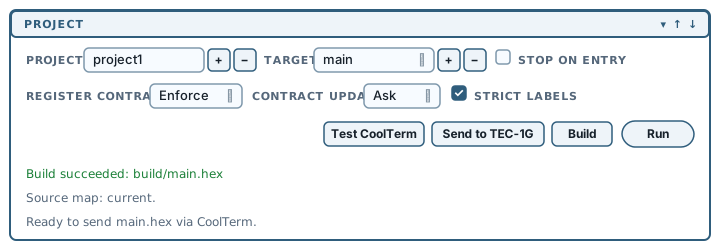
All three are AZM settings. AZM Book 1, Chapter 6 documents register contracts as a language feature.
Register contracts, briefly
A routine reads some registers, writes others and may destroy existing values along the way. A register contract records that use:
.routine out A maybe-out D clobbers D
Helper:
        ld d, 2
        ld a, 1
        ret
Helper returns a value in A, may return a value in D and destroys the caller's existing value in D. A caller that needs its previous D value after the call has a register conflict whose effect may appear only after surrounding code changes.
AZM can infer these contracts by reading the code, compare them against the calls it finds and report conflicts. The first two controls turn that analysis on and determine how its results are handled.
Register Contracts
The Register Contracts dropdown has three values: Enforce, Audit and Off.
| Setting | What AZM does | Effect on your build |
|---|---|---|
| Enforce | Analyses, and treats a proven conflict as an error | The build fails |
| Audit | Analyses and reports | The build succeeds |
| Off | Skips the analysis | The build succeeds |
Enforce is the default. When a build reports a register conflict even though the code assembles elsewhere, Enforce is applying the additional check. The error usually identifies a real conflict; Audit reports it without failing the build.
Enforce and Audit both write the report listed among the chapter 4 build outputs:
build/main.regcontracts.txtThe panel offers three settings; AZM itself has five (off, audit, warn, error, strict). Enforce is AZM's error. The warn and strict values require a hand-edited registerContracts setting in debug80.json. The final section explains how panel builds override that setting.
Contract Updates
The Contract Updates dropdown has three values: Ask, Auto and Never. The default is Ask.
AZM can identify contract problems and update the source. Given a routine whose contract is missing or out of date, it infers the contract from the routine's register operations and produces a corrected version. It can also insert .expectout at call sites where the fix is unambiguous.
This control sets how Debug80 handles that corrected source:
- Never: skips the fix analysis, so your source stays as you wrote it.
- Ask: offers it after a build, showing you which files would change. You can look at a diff before deciding.
- Auto: applies it.
The changes are applied as editor edits, not file writes. The revised text arrives in your open editor as unsaved changes: the diff gutter marks them, and undo reverts them.
Updates apply on Build only. Run leaves the source unchanged and restarts the emulated machine as soon as assembly finishes.
Contract Updates works even with Register Contracts set to Off. Asking for updates turns the analysis on by itself.
Strict labels
Strict labels is a checkbox, ticked by default.
Ticked, a label must be referenced with the capitalization used in its definition; scanhello does not resolve to ScanHello. Unticked, capitalization is ignored.
For new assembly code, leaving it on catches typos that would otherwise resolve to the wrong symbol or fail late. Older source with inconsistent capitalization may require it to be disabled. Glimmer builds use their own label handling.
Persistence across restarts
Although the controls share one row, two belong to the current VS Code window and the third persists in debug80.json:
| Control | Where it lives | Survives a window restart? |
|---|---|---|
| Register Contracts | This VS Code window | No — returns to Enforce |
| Contract Updates | This VS Code window | No — returns to Ask |
| Strict labels | debug80.json | Yes |
Strict labels is the only one that writes to the project. Changing it immediately updates azm.symbolCase in debug80.json, so the setting is shared with anyone else who opens the project.
debug80.json precedence
If you set azm.registerContracts by hand in debug80.json, the panel dropdown overrides it on every Build and Run started from the panel. The hand-written value applies only to builds started outside the panel.
The file-scoped registerContractsPolicy described in AZM Book 1 provides a project-wide contracts policy that persists.