Video, input and serial
The Machine and Displays sections cover the TEC-1G as it comes. The rest of the panel covers what you can plug into it: a video card, a joystick, a full keyboard and a serial line.
The sections and their order
The TEC-1G panel has nine sections: Project, Machine, Displays, TMS9918 Video, Joystick, Matrix Keyboard, Registers, Memory and Serial. Project, Machine, Displays and Registers start open; the rest start closed.

Every header carries ↑ and ↓ buttons to move a section up or down, and the layout you end up with is remembered.
Debug80: Reset Panel Layout puts the default order and open state back on the TEC-1 and TEC-1G panels. The Simple platform's panel has a fixed layout of its own.
The other eight sections appear once the folder is an initialized Debug80 project, and Project is the only one on screen before that.
TMS9918 Video
The TMS9918 Video section emulates the video card on the TEC-Deck expansion, which gives the TEC-1G a 256x192 display with sprites, driven from its own 16 KiB of video RAM.
Opening the section attaches the card at ports 0xBE and 0xBF. Closing it detaches.

A selector switches between PAL 50 and NTSC 60, changing the vertical-blank frequency used by programs that pace themselves from that signal.
Joystick
The Joystick section emulates the TEC-1G joystick as a D-pad with Fire 1, Fire 2, Fire 3 and an auxiliary button. The on-screen buttons and keyboard both drive it: W, S, A and D for directions, J or Space for Fire 1, I for Fire 2, K for Aux, and L for Fire 3.

The arrow keys switch role with the Move and Fire toggle: in Move mode they steer, and in Fire mode they map to the four fire buttons. Switching modes drops any arrow key you are holding, so the new mode starts with every button up.
When several input surfaces are eligible, the joystick outranks the hex keypad. Dead keypad input usually means an open Joystick section.
Matrix Keyboard
The Matrix Keyboard section emulates the TEC-1G's full keyboard as a five-row QWERTY matrix. Its on-screen keys work directly; physical typing reaches it once the matrix owns keyboard focus.
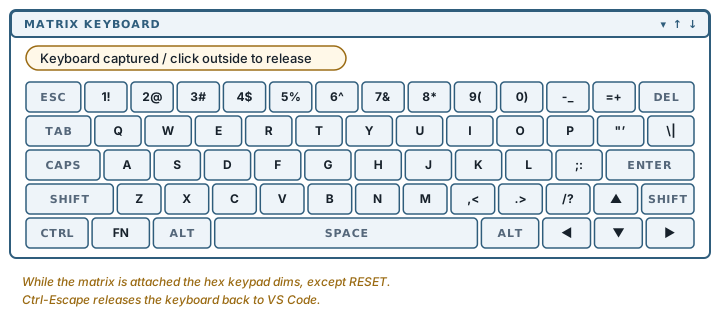
While the matrix is attached the hex keypad is dimmed, with one live exception: RESET, so you can always reset the machine.
A pill above the keypad identifies the current owner of physical key input and the available release action:
Keyboard captured / click outside to releaseIt also reports when the joystick has taken over, and when the keyboard has been released back to VS Code. Ctrl-Escape releases the matrix from the keyboard.
On macOS, Command chords stay with VS Code, so Command-S and Command-P keep working while the emulator has focus. Option chords are read from the physical key rather than the character macOS produces, so Option-S reaches the matrix as S rather than as ß.
Serial
The Serial section is the emulated bit-banged UART (4800 baud on the TEC-1G, 9600 on the TEC-1). It shows what the running program has sent.

SEND FILE feeds a file into the emulated machine one character at a time, pacing itself so a program polling the port can keep up, and it can be cancelled while it runs. SAVE writes the captured buffer out, choosing a .hex extension when every line looks like Intel HEX.
This section talks to the emulated machine; the physical port belongs to CoolTerm, in Sending to TEC-1G hardware.
Reset, and what survives it
RESET on the keypad resets the emulated machine. On the TEC-1G it also releases every held key, joystick direction and matrix key first, and it preserves the monitor's configuration state so MON-3 comes back up the way it went down.
Holding FN while pressing RESET latches the function key for the first keypad read after reset. That reproduces holding a key down while a real board boots, which is how MON-3's startup options are selected.
Non-maskable interrupts happen as a consequence of input: pressing a key raises one, and the video card raises one at vertical blank while it is attached. Releasing an input cancels a pending NMI.